Visum Importer
Importing a network from Visum
The Visum importer imports Visum networks (NET files) whose language is English, German or French. Aimsun Next can not directly read a Visum VER file; the importer works with NET files. It detects whether the file is encoded in UTF-8 or Latin-1.
A Visum network should be imported into a new Aimsun document containing no previous geometry.
To import a Visum network:
-
Select File > Import > Visum Network Files.
-
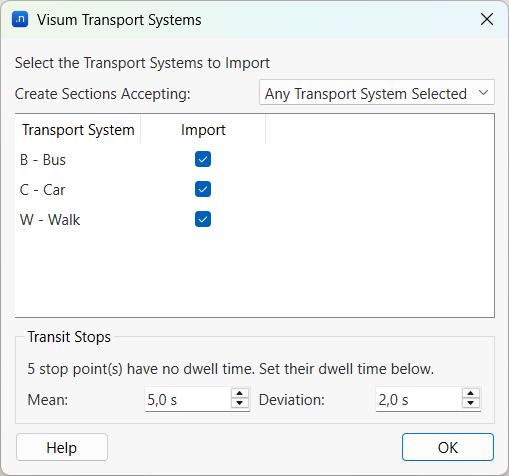
Find the NET file you want to import and click Open. The Visum Transport Systems dialog is displayed.
-
Adjacent to Create Sections Accepting, select one of the two following options from the drop-down list:
- Any Transport System Selected to import the sections where at least one of the selected Transport Systems is permitted.
-
All Transport Systems Selected to import the sections where all selected Transport Systems are permitted.
-
From the Transport System list, tick one or more of the options in the Import column. The selection also applies to turns, centroid connections, and vehicle types.
-
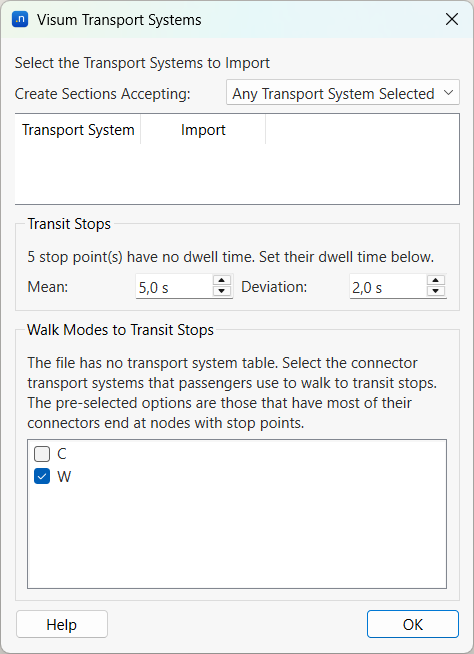
If there are Visum stop points that have no dwell time defined, the Transit Stops group is displayed. Enter the dwell time of these stop points with a Mean and a Deviation. The default values are 5 s and 2 s. Enter a mean of 0 to keep the stops without dwell time, as in Visum. See Dwell times.
-
If the NET file has no transport system table, the Walk Modes to Transit Stops group is displayed. Tick the transport systems that passengers use to walk to transit stops. The importer pre-selects the transport systems whose connectors mostly end at nodes with stop points. See Visum Connectors and Aimsun Centroid Connections.
-
Click OK to complete the import.
When the import runs without a user interface (using aconsole), all transport systems are imported, sections are created when any transport system is permitted, stop points without dwell time use the default of 5 s and 2 s, and, if the file does not have a transport system table, then the walk modes are inferred from the connectors that mostly end at nodes with stop points. The log states the dwell time and the walk modes used, when applicable.
Relationships between Visum and Aimsun objects
Infrastructure
Visum Links and Aimsun Sections
Visum Links are imported as Aimsun road sections using the following mapping. Each direction of a Visum Link is a separate Aimsun road section.
- External Id: Visum Link No, FromNodeNo and ToNodeNo are imported as the Aimsun road section External ID, in the format LinkNo_FromNodeNo_ToNodeNo.
- Name: Visum Link Name is imported as the Aimsun road section Name.
- Origin Node: Visum Link FNode is imported as the Aimsun road section Origin Node.
- Destination Node: Visum Link TNode is imported as the Aimsun road section Destination Node.
- Points: If the Visum Link has Link Polygons defined, these points are used to calculate the Aimsun road section Polyline, otherwise the section is created as a simple segment (using origin and destination node points).
- On/Off Ramp: On/Off Ramp information is imported from Visum Lanes Table to the Aimsun road sections.
- Number of Lanes: Visum Link NLanes is imported as the Aimsun section Number of Lanes (excluding On/Off Ramps).
- Length: Visum Link Length is imported as the Aimsun road section Length.
- Speed: Visum Link V0prt is imported as the Aimsun road section Speed Limit.
- Capacity: Visum Link Capprt is imported as the Aimsun road section Capacity.
- Road Type: Visum Link Type is imported as the Aimsun road type.
- Reserved Lanes: Visum Link BUS_LANES are imported as Aimsun transit reserved lanes.
- Lane Capacity: Visum Link Lane Capacity is imported as an Aimsun road section attribute with external name "GKSection::Visum::LaneCapacity".
- From Node and To Node: Visum Link FromNodeNo and ToNodeNo are imported as the Aimsun road section attributes with external names "GKSection::Visum::LinkFromNode" and "GKSection::Visum::LinkToNode".
Visum Link Types and Aimsun Road Types
Visum Link Types are imported as Aimsun Road Types using the following mapping:
- External Id: Visum Link Type No is imported as the Aimsun Road Type External ID.
- Name: Visum Link Type Name is imported as the Aimsun Road Type Name.
- Speed: Visum Link Type V0prt is imported as the Aimsun Link Type Speed Limit.
- Capacity per Lane: Visum Link Type Capprt is imported as the Aimsun Link Type Capacity.
Visum Nodes and Aimsun Nodes
Visum Nodes are imported as Aimsun Nodes using the following mapping. A Visum Node without turns (such as a dead end) is not imported as an Aimsun Node; its sections end there without a node.
- External Id: Visum Node No is imported as the Aimsun Node External ID.
- Geometry: Aimsun Node Geometry is calculated adapting Section geometry to avoid Section overlaps.
- Main Node No: Visum Main Node No is imported as the Aimsun Node attribute with external name "GKNode::Visum::MainNodeNo".
- Node Control Type: Visum Node Control Type is imported as the Aimsun Node attribute with external name "GKNode::Visum::NodeControlType".
- Main Node Control Type: Visum Main Node Control Type is imported as the Aimsun Node attribute with external name "GKNode::Visum::MainNodeControlType".
- Node ICAsneakers: Visum Node ICAsneakers is imported as the Aimsun Node attribute with external name "GKNode::Visum::NodeICAsneakers".
- Main Node ICAsneakers: Visum Main Node ICAsneakers is imported as the Aimsun Node attribute with external name "GKNode::Visum::MainNodeICAsneakers".
- Major Flow Orientation1: Visum Major Flow Orientation1 is imported as the Aimsun Node attribute with external name "GKNode::Visum::MajorFlowOrientation1".
- Major Flow Orientation2: Visum Major Flow Orientation2 is imported as the Aimsun Node attribute with external name "GKNode::Visum::MajorFlowOrientation2".
- Roundabout Inscribed Diameter: Visum Roundabout Inscribed Diameter is imported as the Aimsun Node attribute with external name "GKNode::Visum::RoundaboutInscribedDiameter".
- ICA Entry Width: Visum ICA Entry Width is imported as the Aimsun Node attribute with external name "GKNode::Visum::ICAEntryWidth".
- ICA Approach Half Width: Visum ICA Approach Half Width is imported as the Aimsun Node attribute with external name "GKNode::Visum::ICAApproachHalfWidth".
- ICA Flare Length: Visum ICA Flare Length is imported as the Aimsun Node attribute with external name "GKNode::Visum::ICAFlareLength".
- Roundabout Entry Radius: Visum Round About Entry Radius is imported as the Aimsun Node attribute with external name "GKNode::Visum::RoundAboutEntryRadius".
- ICA Entry Angle: Visum ICA Entry Angle is imported as the Aimsun Node attribute with external name "GKNode::Visum::ICAEntryAngle".
Visum Turns and Aimsun Turns
Visum Turns are imported as Aimsun Turns using the following mapping:
- Node: Visum Turn ViaNode is imported as the Aimsun Turn Node.
- Origin Section: Visum Turn ViaNode and FNode are used to deduce the Aimsun Turn Origin Section.
- Destination Section: Visum Turn ViaNode and TNode are used to deduce the Aimsun Turn Destination Section.
- User-defined Cost: Visum Turn T0prt is imported as the Aimsun Turn User-defined Cost.
- Main Node No: Visum Main Node No is imported as the Aimsun Turn attribute with external name "GKTurning::Visum::MainNodeNo".
- Capacity: Visum Turn Capprt is imported as the Aimsun Turn specific attribute with external name "GKTurning::Visum::Capacity".
- Transport Systems: Visum Turn TSysSet is imported as the Aimsun Turn attribute with external name "GKTurning::Visum::TSysSet".
- Use Preset Critical Gap: Visum Use Preset Critical Gap is imported as the Aimsun Turn attribute with external name "GKTurning::Visum::UsePresetCriticalGap".
- Preset Critical Gap: Visum Preset Critical Gap is imported as the Aimsun Turn attribute with external name "GKTurning::Visum::PresetCriticalGap".
- Use Preset Follow Up Time: Visum Use Preset Follow Up Time is imported as the Aimsun Turn attribute with external name "GKTurning::Visum::UsePresetFollowUpTime".
- Preset Follow Up Time: Visum Preset Follow Up Time is imported as the Aimsun Turn attribute with external name "GKTurning::Visum::PresetFollowUpTime".
- ICA Use Preset Sat Flow Rate: Visum ICA Use Preset Sat Flow Rate is imported as the Aimsun Turn attribute with external name "GKTurning::Visum::ICAUsePresetSatFlowRate".
- ICA Preset Sat Flow Rate: Visum ICA Preset Sat Flow Rate is imported as the Aimsun Turn attribute with external name "GKTurning::Visum::ICAPresetSatFlowRate".
Turn Lane information is not defined in Visum for all turns. Aimsun will create turns in two different ways depending on the information that Visum provides:
- Nodes without Lane Turns defined in Visum: Aimsun Next creates a turn for each Visum Turn whose transport systems are selected in the import dialog, with all the Section lanes connected.
- Nodes with Lane Turns defined in Visum: Visum Turn Lanes are imported as Aimsun Turns using the following mapping:
- Node External Id: Visum NodeNo is used to find the Aimsun Turn Node.
- Origin Section: Visum FromLinkNo is imported as Origin Section.
- Destination Section: Visum ToLinkNo is imported as Destination Section.
- Origin Lane: Visum FromLaneNo is used to provide the Aimsun Turn Origin From Lane and Origin To Lane.
- Destination Lane: Visum ToLaneNo is used to provide the Aimsun Turn Destination From Lane and Destination To Lane.
Visum Detectors, Visum Count Locations and Aimsun Detectors
Visum Detectors are imported as Aimsun Detectors using the following mapping:
- External Id: Visum Detector No is imported as the Aimsun Detector External ID.
- Name: Visum Detector Name is imported as the Aimsun Detector Name.
- Lanes: Visum Detector Lane and NLanes are used to deduce the Aimsun Detector From Lane and To Lane.
- Section: Visum Count Location LinkNo, FNode, and TNode are used to deduce the Aimsun Detector Bottom Section.
- Position: Visum Count Location RelPos is imported as the Aimsun Detector Position.
Traffic Demand
Visum Zones and Aimsun Centroids
Visum Zones are imported as Aimsun Centroids using the following mapping:
- External Id: Visum Zone No is imported as the Aimsun External ID.
- Position: Visum Zone XCoord and YCoord are imported as the Aimsun Centroid Position.
Visum Connectors and Aimsun Centroid Connections
Visum Connectors are imported as Aimsun Centroid Connections using the following mapping. Only the connectors whose transport systems are selected in the import dialog are imported.
- Centroid: Visum Connector ZoneNo is imported as the Aimsun Centroid Connection Centroid.
- Connected Object: Visum Connector NodeNo is used to find the Aimsun Centroid Connection Connected Object: the Aimsun Node, or the transit stops at that node for passengers who walk to public transport (see below).
- Connection Type: Visum Connector Direction is imported as the Aimsun Connection Type: O (origin) connects the centroid as an origin, D (destination) as a destination, and OD as both.
- Weights: Visum Connector Weight(PrT) and Weight(PuT) are imported as the Aimsun Node attributes with external names "GKNode::weightPrt" and "GKNode::weightPut".
In Visum, passengers reach public transport through connectors whose transport systems are walk modes (type PuTWalk in the Visum transport system table). The importer uses the transport system of each connector to decide what it connects to:
- A connector with walk modes and other transport systems is connected to both its node and the transit stops at that node in both directions.
- A connector with only walk modes is connected to the transit stops at its node in both directions, and not to the node. If the node does not have any transit stops, the connector is connected to the node.
- A connector without walk modes is connected to its node.
The transit stops at a node are the stops of the Visum stop points on that node (see Visum Stop Points and Aimsun Transit Stops). When a stop belongs to a transit station, the centroid is connected to the station instead of to the stop.
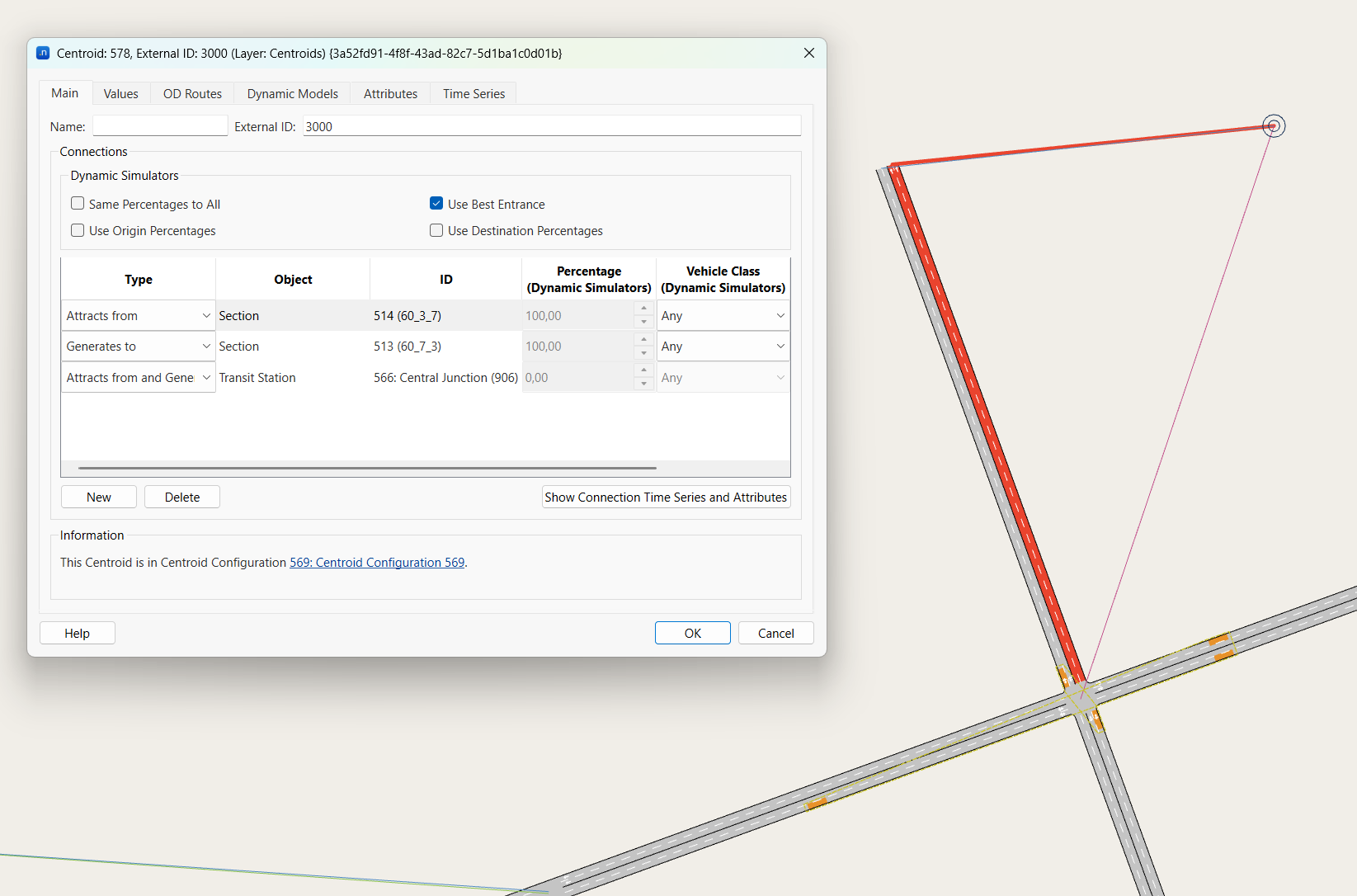
The zone has a car-only connector at a dead end, imported as the two section connections, and a walk-only connector at the junction, imported as a connection to the transit station of the junction's stops.
When the NET file does not have a transport system table, the importer infers the walk modes. A transport system is considered to be a walk mode when more than half of the connectors that use it end at a node with a stop point. These transport systems are pre-selected in the import dialog, where they can also be unselected. The log states the walk modes used.
Visum Transport Systems and Aimsun Vehicle Types
Visum Transport Systems are imported as Aimsun Vehicle Types using the following mapping. Only the transport systems selected in the import dialog are imported.
- External Id: Visum Transport System Name is imported as the Aimsun Vehicle Type External ID.
- Name: Visum Transport System Code and Name are imported as the Aimsun Vehicle Type Name, in the format Visum T.System Code - Name.
- PCU: Visum Transport System PCU is imported as the Aimsun Vehicle Type PCU.
- Vehicle Class: Vehicle Types whose name contains "bus" are added to the public transport vehicle class.
Visum OD Matrices in *.mtx files and Aimsun OD Matrices
The importer finds all the Visum OD Matrix files in *.mtx format located exactly in the same folder as the *.net file and creates an Aimsun OD Matrix for each *.mtx file it reads. The OD Matrix properties such as number of trips between each pair of zones, time period and scaling factor stored in Visum *.mtx files are imported and hold the same definition as OD Matrices in Aimsun Next. The exception is the Vehicle Type as in the Visum *.mtx file the Vehicle Type is not associated with OD Matrix, while the OD Matrix formulation in Aimsun Next does require selection of the associated Vehicle Type.
The importer deduces the Vehicle Type of each OD Matrix from the name of its *.mtx file. The first rule that matches is used:
- The file name is the Aimsun Vehicle Type name, for example Visum T.System C - CAR.mtx.
- The file name is the Visum Transport System name, for example CAR.mtx.
- The file name is the Visum Transport System code, for example C.mtx.
- The file name contains a Visum Transport System name, for example CAR_morning.mtx. If it contains several names, the longest one is used.
The comparison is case insensitive. If no rule matches, the OD Matrix has no Vehicle Type. The OD Matrix External ID is the file name, and its Name is the file name followed by the start and end times.
Importing OD Matrices will not automatically store the trips in the Aimsun document, they will be created as External Matrices. These OD Matrices will be stored in the Aimsun document only if specified in the matrix options.
Transit Lines
Visum Lines, Visum Line Routes, Visum Line Route Items, and Aimsun Transit Lines
Each Visum Line Route is imported as an Aimsun Transit Line using the following mapping:
- Name: Visum Line Name and Line Route DirectionCode are imported as the Aimsun Transit Line Name, in the format LineName-DirectionCode.
- External Id: Visum Line Route Name is imported as the Aimsun Transit Line External ID.
- Route: Visum Line Route Items, in Index order, are used to deduce the Aimsun Transit Line Sections: the sections that connect each node of the line route to the next one.
- Transit Stops: Visum Line Route Items with a StopPointNo and IsRoutePoint set are imported as the Aimsun Transit Line Stops. Items with a StopPointNo where IsRoutePoint is not set are stop points that the line passes without stopping.
- Timetable: Each Aimsun Transit Line gets one timetable, named "Visum", with one schedule. Visum Vehicle Journey Dep times of the line route are imported as the schedule departure times.
- Vehicle Type: Visum Line TSysCode is imported as the Aimsun Transit Line Schedule Departure Vehicle Type.
- Stop Times: Visum Stop Point DefDwellTime is imported as the stop time of each stop. See Dwell times.
The first item of a Visum Line Route has no previous node, so the importer does not know which section the line arrives on. When the first item has a stop point on a node, the importer adds one section to the start of the route so that the line can stop there: if one or more sections turn into the first section of the route, the importer adds the one that crosses the least traffic: the rightmost turn with right-side traffic or the leftmost with left-side traffic. The first stop goes at the end of the added section, just before the node.
If no section turns into the first section of the route (for example, at a dead end), the importer does not add a section. The first stop goes at the start of the first section of the route.
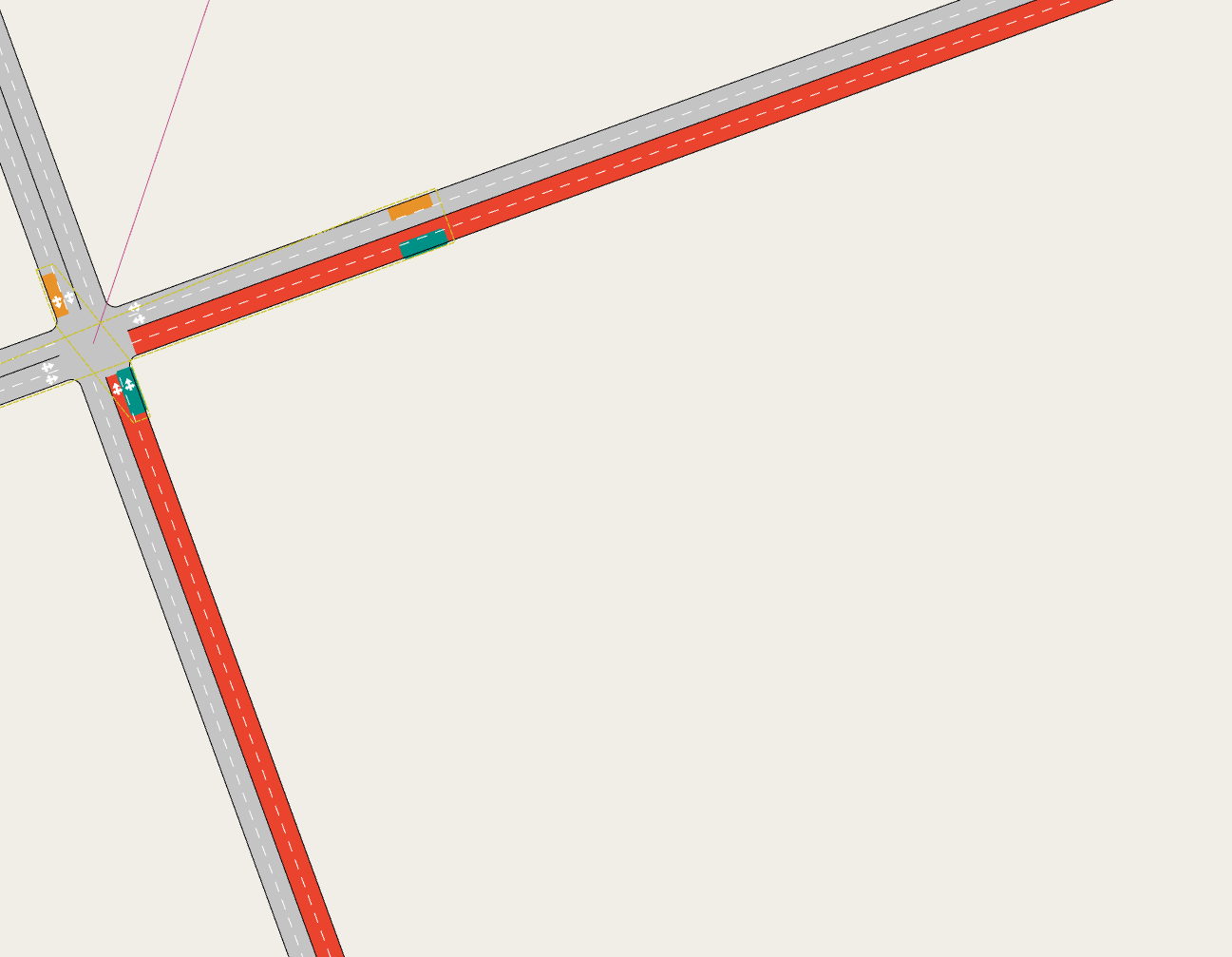
The selected transit line (red) starts at the junction and runs to the right. The importer adds the section that turns right into the route, from the bottom of the image, and places the first stop at its end. The stops of the selected line are shown in teal.
Visum Stop Points and Aimsun Transit Stops
Visum Stop Points are imported as Aimsun Transit Stops. A Visum Stop Point is placed either on a link or on a node. One Visum Stop Point can give several Aimsun Transit Stops, one per section, all of which have the same External ID.
All Aimsun Transit Stops use the following mapping:
- External Id: Visum Stop Point No is imported as the Aimsun Transit Stop External ID.
- Name: Visum Stop Point Name is imported as the Aimsun Transit Stop Name.
- Length: The Aimsun Transit Stop is 10 m long. On a section shorter than 10 m, it is a terminal stop that covers the whole section.
- Lane: The Aimsun Transit Stop is on the rightmost lane with right-hand traffic, and on the leftmost lane with left-hand traffic.
Stop points on links: Visum Stop Points with a LinkNo are imported as follows:
- Section: Visum LinkNo, FromNodeNo and Directed are used to deduce the sections of the stop. A directed stop point gets one stop, on the section that starts at FromNodeNo. An undirected stop point gets one stop on each direction of the link, at the same place. When FromNodeNo is empty, the direction is unknown and the stop point is treated as undirected.
- Position: Visum RelPos is the relative position on the link, measured from FromNodeNo. The Aimsun Transit Stop is centred on that position, and it is moved as little as necessary to stay inside the section.
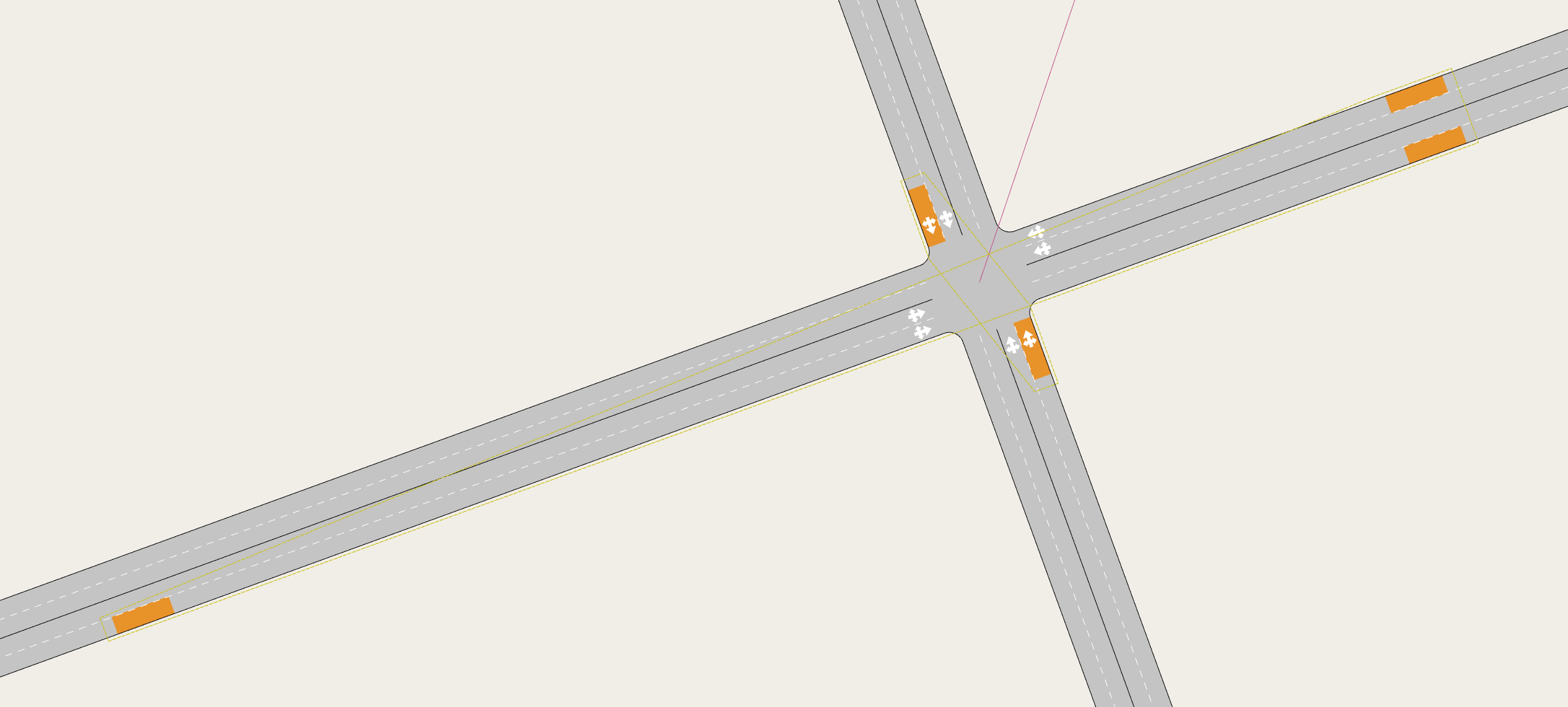
Bottom left: a directed stop point gets one stop, in its direction only. Top right: an undirected stop point gets one stop in each direction, at the same place. The two stops next to the junction belong to a node stop point.
Stop points on nodes: Visum Stop Points with a NodeNo and no LinkNo are imported as follows:
- Section: A line stops at a node stop point on the section it arrives on. The importer creates a stop at the end of each section on which a line reaches the node to stop there. Lines that arrive on the same section share the stop. A node stop point that no line stops at gets no stop.
- Position: The Aimsun Transit Stop ends at the end of the section.
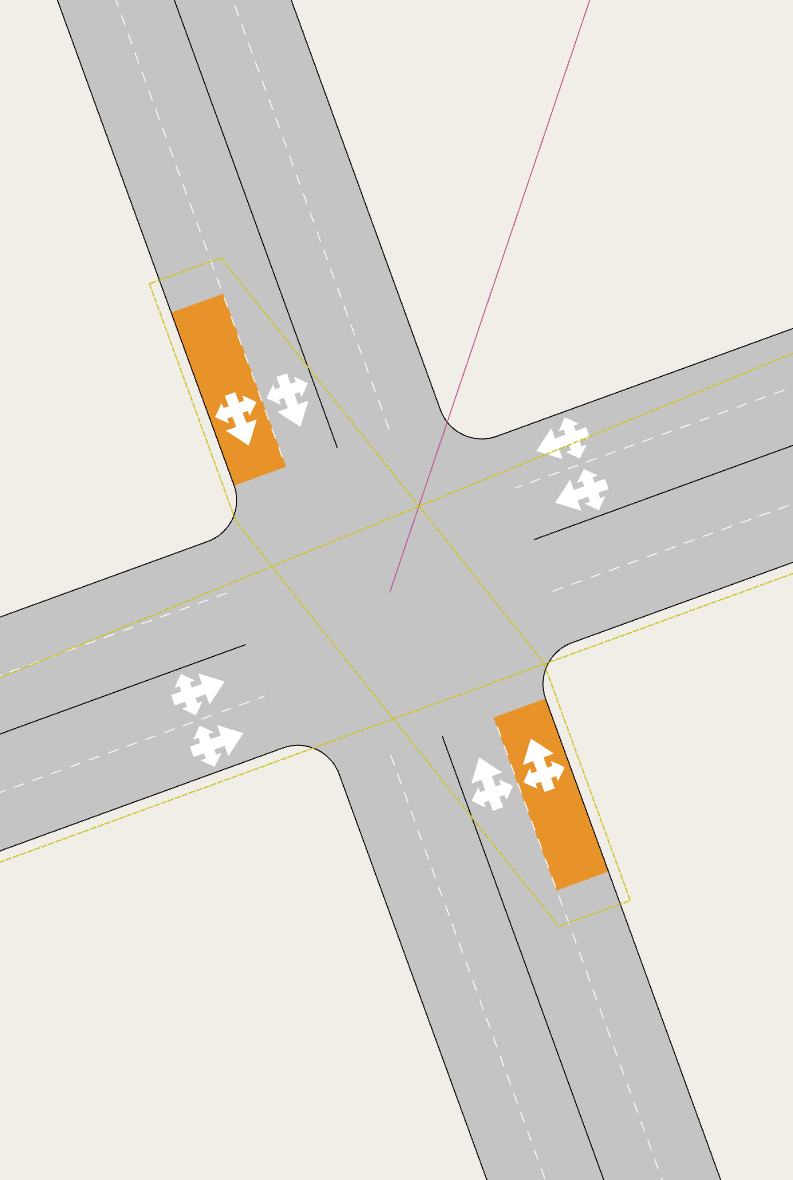
One stop point on the junction node. Two lines stop there, arriving from the top and from the bottom of the image, so it gets one stop at the end of each of these two sections. The other two approaches have no stop, because no line arrives from them to stop at the junction.
A transit line can stop only once on each section. If a line already has a stop on a section (for example, a link stop point at the end of the link), a node stop point on the next node is not added to that line.
A Visum Stop Point with neither a LinkNo nor a NodeNo is not imported. The log displays a warning for the LinkNo column of the Stop Points table when the file contains such stop points.
Visum Stop Areas and Aimsun Transit Stations
The Aimsun Transit Stops of the Visum Stop Points that have the same StopAreaNo are grouped into an Aimsun Transit Station. The stops of a node stop point without StopAreaNo are grouped into a station of their node. A station is created only when it has two stops or more.
- External Id: Visum StopAreaNo is imported as the Aimsun Transit Station External ID. A station of a node has the External ID N followed by the Visum Node No.
- Name: The Visum Stop Point Name of the first stop point with a name is imported as the Aimsun Transit Station Name. If no stop point has a name, the station is named Stop area followed by the StopAreaNo, or Stops at node followed by the Node No.
- Stops: The Aimsun Transit Stops of the stop points are the stops of the station.
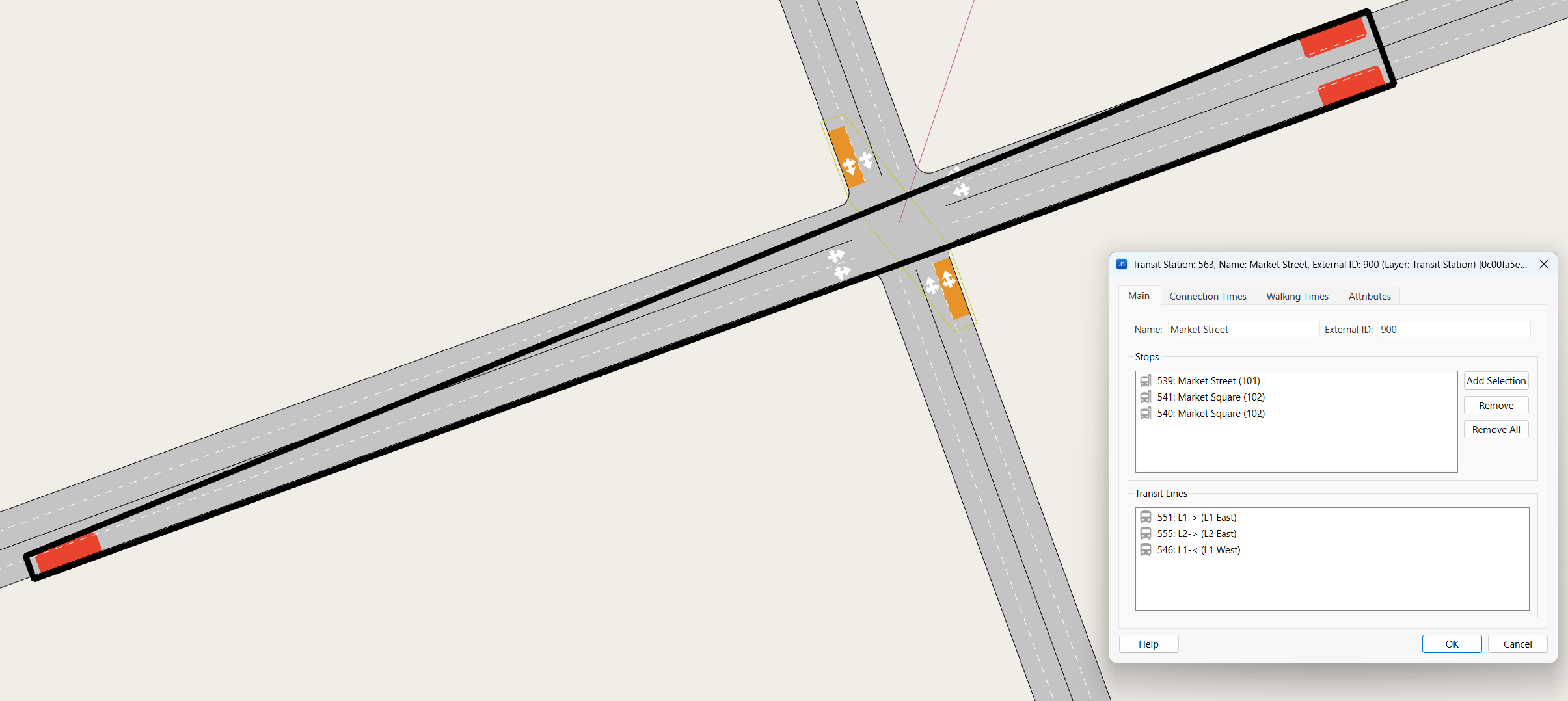
Two stop points share a stop area: a directed one (bottom left, one stop) and an undirected one (top right, two stops). Their three stops, in red, are grouped into one transit station, outlined in black.
Dwell times
Visum Stop Point DefDwellTime is imported as the stop time of each stop, with a deviation of 0. With a dwell time of 0, the transit vehicles do not stop in an Aimsun Next simulation. The import dialog asks for a default dwell time for the stop points that do not have one set (see Importing a network from Visum).
Control plans
Visum Signal Groups, Visum Signal Control to Node, Visum Signal Groups to Lane Turn and Aimsun Signal Groups
Visum Signal Groups, Signal Control to Node, and Signal Groups to Lane Turn are imported as Aimsun Signal Groups using the following mapping:
- External Id: Visum Signal Group No is imported as the Aimsun Signal Group External ID.
- Name: Visum Signal Group Name is imported as the Aimsun Signal Group Name.
- Turn: Visum Signal Groups to Lane Turn FromLinkNo and ToLinkNo are imported as the Aimsun Signal Group Turn.
- Node: Visum Signal Control to Node NodeNo is imported as the Aimsun Signal Group Node.
Visum Signal Control, Visum Signal Group, Visum Signal Control to Aimsun Node, Aimsun Control Node, and Aimsun Control Plan
Only Visum Signal Controls of types Fixed and Signal Group Based, coordinated or free, are imported. Visum Signal Control, Signal Group, and Signal Control to Node objects are imported as Aimsun Control Nodes and Control Plans using the following mapping:
- Cycle: Visum Signal Control CycleTime is imported as the Aimsun Control Node Cycle Time.
- Offset: Visum Signal Control Offset is imported as the Aimsun Control Node Offset.
- Phase Start: Visum Signal Group GTStart is imported as the Aimsun Phase Start Time.
- Phase Duration: Visum Signal Group GTStart and GTEnd are used to calculate Phase End Time.
- Phase Yellow Time: Visum Signal Group Amber is imported as the Aimsun Phase Yellow Time.
- Phase Minimum Green Time: Visum Signal Group MinGreenTime is imported as the Aimsun Phase Minimum Green Time.
Preferences
- Rule of the Road: Visum LeftHandTraffic is imported as the Aimsun Rule of the Road. If the NET file does not have a network table, the Rule of the Road of the Aimsun document is kept.
- Coordinate System: Visum ProjectDefinition is imported as the Aimsun Default Coordinate System
Notes
- Tables and columns read can be found within the file attributes.vis. This file can be found in the path:
- Installation folder of Aimsun Next/plugins/VISUMIMPORTERDATA
- The transit tables read are Stop Points, Lines, Line Routes, Line Route Items, Vehicle Journeys, Connectors, and Transport Systems. The Stops and Stop Areas tables are not read; stop names come from the Stop Points table.