WMS Importer
WMS (Web Map Service) is a protocol for serving geo-referenced map images from a server which gathers its data from GIS or other sources. The WMS service was developed by the Open Geospatial Consortium. WMS servers are provided by numerous data services, linked to crowd sourced data, commercial data or to data provided by national and international organizations.
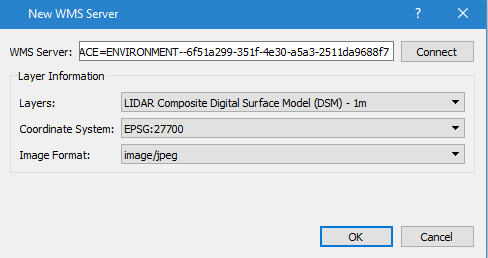
Add a new WMS server using the Tools menu, Add WMS Server option. The WMS server URL is obtained from the information provider and can include the parameter request=GetCapabilities although this will be added if it is not provided in the URL, Connecting to the server will download a list of layers with their co-ordinate systems and image formats. If the server cannot be reached or returns an error, a message will pop up. WMTS servers are not supported. Click OK to add a layer from the WMS server to the list of layers in the model shown in the Layers Window.
The Coordinate System list contains the coordinate systems that the selected layer offers. The coordinate system of the project is selected by default when the layer offers it.

Activating that layer in the Layers Window will then include the images sourced from the WMS server in the 2D display. To stop receiving the images deselect the layer in the Layers Window and to remove the server, delete the layers associated with it.
Images are requested from the server while the layer is drawn; nothing is stored in the project, so WMS layers do not have a Retrieve tab or Retrieve External Data option. If the first image of a layer takes more than a second to arrive, the task bar will indicate that the layer is loading. When the server does not return images for a layer, the Log Window will indicate the cause.
WMS Authentication
If the WMS server needs authentication, it's requested via a Login dialog.
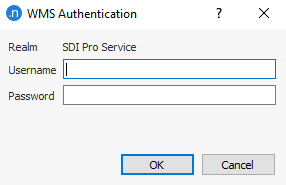
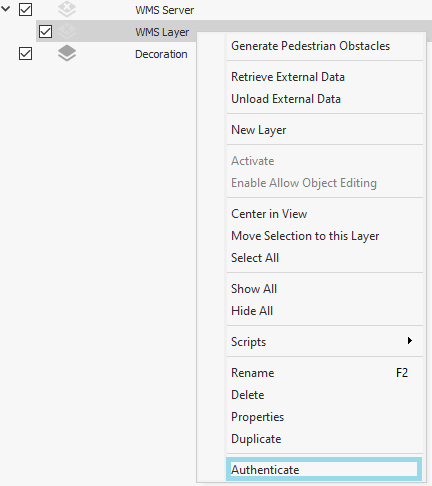
Dismiss or error entering the credentials disables the layer until authentication is done. As long as authentication fails, an Authentication option appears in the context menu of the layer. Click Authentication and the previous Login dialog appears.