Metering
A ramp meter is a device to regulate the flow of vehicles. Typically this is a car park barrier, a toll gate or a ramp meter on a freeway. A ramp meter holds back the flow of vehicles and releases them according to the type of meter; these are:
- Green-time ramp meter and Green-time by lane ramp meter: The ramp meter is a traffic signal with fixed or variable times.
- Flow ramp meter: The ramp meter aims to give a specified flow rate to pass it.
- Flow-ALINEA ramp meter: The ramp meter implements the ALINEA algorithms for ramp meters.
- Delay ramp meter:The ramp meter delays each vehicle by specified time.
Note that while a meter can be positioned at any location in a section, in mesoscopic simulation, all ramp meters will be applied at the end of the section.
Ramp Meter Editing
A meter can be created using the Ramp Meter Tool. Click on the tool in the tool bar then select the section and position where the ramp meter is to be located in a 2D view.

Once the meter is located on a section it can be translated to any position along the section by selecting and dragging it using the mouse. The meter can also be adjusted to cover a subset of lanes on the section by dragging the selection handles on the meter edges or to cover a length of a section by dragging the meter edges. If the meter is to be moved to a different section, press the Ctrl key when selecting and dragging it using the mouse to the destination section. Double clicking on the ramp meter will bring up the properties editor to set the appearance of the meter and its control actions.
Alternatively, the distance of the ramp meter from the start and to the end of the section can be specified through the corresponding options in the context menu.
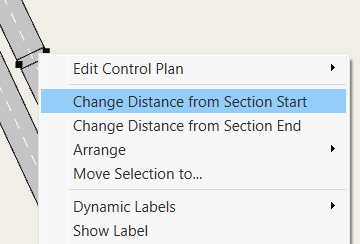
From the context menu, the control plan parameters for the ramp meter can be accessed, and it also contains options to label the ramp meter with its ID, or with a Dynamic Label to show any of the attributes of the ramp meter appropriate to its type of operation i.e. the Green Time per Lane if the ramp meter has that property.
Ramp Meter Editor
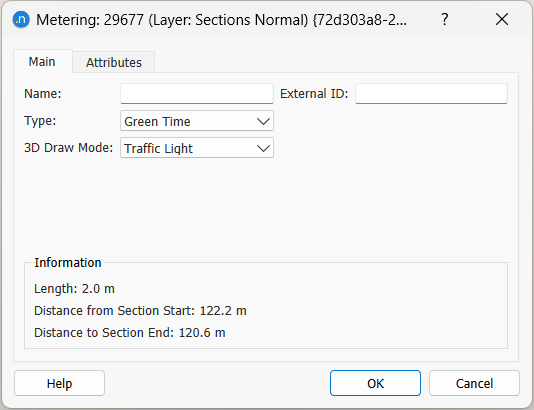
The ramp meter name and external ID are set here as well as the type and the visualization in 3D
The control type for ramp meter is set in the ramp meter editor, the detail of how a control is configured is described under the Ramp Meter topic in the Control section.
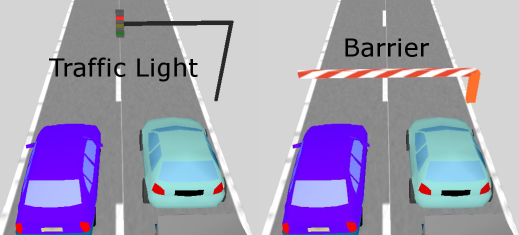
A ramp meter can be drawn as a Traffic Light, as a Barrier or it can be invisible.
The time taken for a barrier to move from the stopped (horizontal) position to the open (vertical) position is specified in the 3D Preferences section.
Simulation behavior
A mesoscopic simulation does not include acceleration and deceleration components in its car following model and hence, vehicles in a mesoscopic simulation are always considered to use their target speed. This simplification is mesoscopic simulation is important in all situations were the acceleration and deceleration plays an important role in the calculation of vehicles travel time. In particular the delay ramp meter option, used in a mesoscopic simulation, only applies an extra delay time to all vehicles affected by the meter. Hence, vehicles going through a meter will not be simulated to stop at the meter point, wait the delay time and then accelerate to achieve their target speed. They are only penalized with an extra delay time. It is therefore not possible to compare, in detail, two simulations using mesoscopic and microscopic behavior models when the model includes a meter.