Path Assignment Plan
A Path Assignment Plan is a collection of Path Assignments and time intervals. Assembling a set of path assignments into a single path assignment plan eases the task of choosing which path assignment should be used for which time period as an input to a dynamic scenario (either SRC or DUE) or static scenario.
The Path Assignment Plan is designed to serve three purposes:
- You are running multiple macro assignments, for different periods, and you want to use those paths for different periods within a single simulation,
- You are running separate DUEs for different time periods, then you want to run a dynamic simulation either SRC or DUE that spans multiple time periods without having to run and calibrate all separate DUEs or SRCs that exactly match that period,
- You want to combine into a SRC parts of other path assignment results. In this case, if the interval of the dynamic path assignment results is shorter that its original duration, the user can select the start time and duration of the path assignment to be included in the Path Assignment Plan.
Requirement
When using a Path Assignment Plan as input for an assignment or a dynamic simulation, the whole traffic demand duration must be covered with Path Assignment items. If this condition is not met, then the dynamic simulation will be cancelled and an error message will be printed on the Log window. The Check and Fix will also detect this issue showing Error 34455.
Having a Path Assignment Plan that covers a longer period than the Traffic Demand is allowed, parts outside the Traffic Demand duration will be disregarded (for the particular details on the Warm-Up, check the Path Assignment Plan Usage section).
Path Assignment Plan Editing
Use the Project menu, or the Demand Data context menu in the Project window, to create a new Path Assignment Plan. They can also be created from their own folder context menu (Path Assignment Plans).
Path Assignment Plan Dialog
Open the Path Assignment Plan dialog by double-clicking on the Path Assignment Plan object in the Project window or accessing Properties in the path assignment plan's context menu.
Main Folder
Similarly to editing a traffic demand, editing a path assignment plan consists of setting the Initial Time and Duration for which the plan will apply, and adding the Path Assignment Items to cover the time intervals. Static and dynamic DUE path assignments can be used, and the two types can be combined within a Path Assignment Plan.
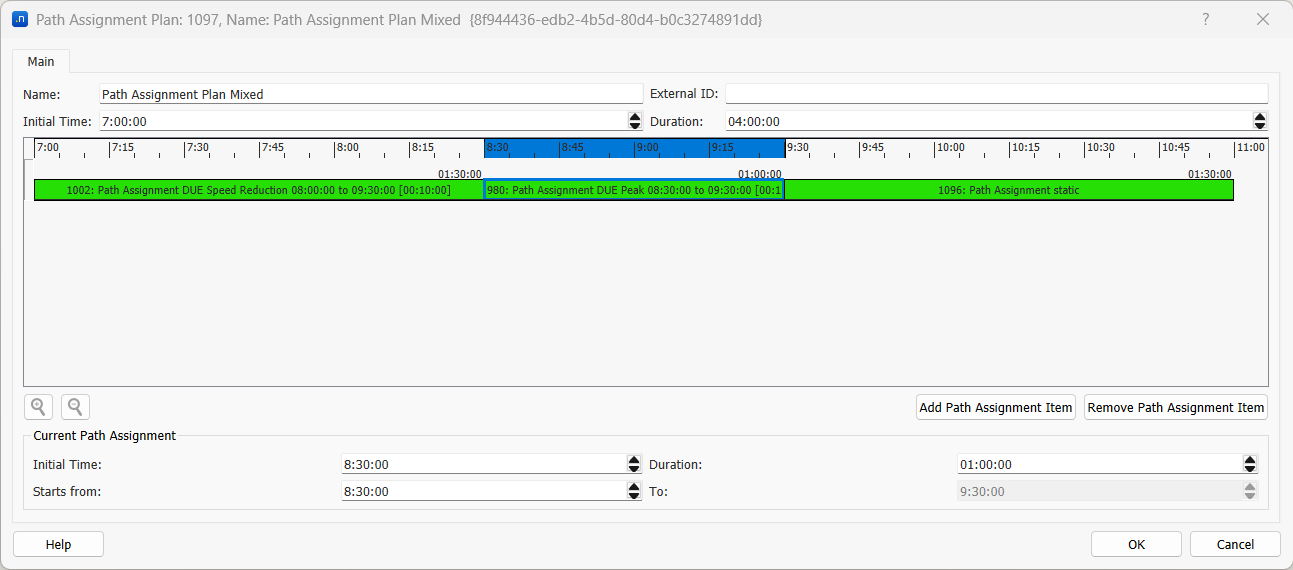
Once a Path Assignment has been set as an Output for a Result or Macroscopic experiment whose scenario's traffic demand has been set, its context parameters such as initial time and duration, and route choice interval for DUEs, will be determined. This will allow it to be included in a Path Assignment Plan, even if the Path Assignment has not been calculated yet.
When adding a path assignment item coming from a macroscopic assignment, the interval for which it applies can be manually stretched or expanded, by editing the item's length and position in the diagram or by setting its Initial Time and Duration.
When adding a path assignment coming from a DUE dynamic simulation, it cannot be stretched or expanded, but the user can select which intervals to use, and apply it to any other time frame with the same duration, by setting the following parameters:
- Initial Time and Duration: the interval that this Path Assignment item covers in the Path Assignment Plan. It can also be graphically edited through the diagram.
- Starts from and To: the interval that will be extracted from this Path Assignment item to fill the Path Assignment Plan item interval.
That is, if the DUE path assignment covers, for example 2 hours in 15 min intervals, starting at 8AM, the user may apply part of it to a shorter period and specify which part of it is used for that period. In the image above, we select from an 8AM-10AM plan only the part corresponding from 8:30 to 9:30 by setting the Starts from and the To parameters. It would even be possible to apply the Path Assignment's 9AM to 10AM data to the 8:30-9:30 period in the plan if we set Initial Time: 8:30:00, Duration: 01:00:00, Starts from: 09:00:00 To: 10:00:00.
The dynamic scenario using a path assignment plan as input will, at each route choice interval, look for the corresponding time in the path assignment plan to pick up the corresponding path assignment results at that time.
Path Assignment Plan usage
-
The path assignment plan can be used as input for a static assignment or dynamic simulation (SRC/DUE).
-
The path assignment plan can use single or multiple static path assignments, single or multiple dynamic DUE path assignments, or also a mix of static and dynamic DUE path assignment files.
-
The path assignment plan does not need to cover the warm-up period. If it does, the warm-up period will use the corresponding information. If it doesn't, then the warm-up will use the very first path assignment information it can find in the Path Assignment Plan. In the unlikely case of a long warm-up whose first part is not covered by the Path Assignment Plan and a second part is, the simulation will use the Path Assignment Plan for the covered period, but not for the first period, that will be using then the simulation path choice algorithm.
-
Static path assignment file(s) can be set to a path assignment plan and loaded as input to either a static or dynamic simulation without any time limitations. Dynamic path assignment file(s) generated from a DUE(s) (i.e. 16:00-19:00) could be set to a path assignment plan and loaded as input to a shorter period dynamic simulation (17:00-18:00). In that case, only DUE paths stored in the path assignment file from 17:00-18:00 will be applied to the dynamic simulation. When using only part of the DUE path assignment data, the selected interval must be compatible with the route choice interval.
-
The path assignment plan can be loaded as input in a DUE simulation even when route choice intervals between the experiment of the input DUE path assignment item(s) and the dynamic experiment don't match. In that case, the percentages of the OD paths assigned in the dynamic experiment use proportion of the intervals of the DUE path assignment. For example, if the path assignment plan contains a path assignment item generated by a DUE with a demand from 08:00 to 09:00 with 10 minutes route choice interval (in total 6 intervals) and the dynamic experiment that loads this DUE path assignment plan starts at 08:00 and finishes at 09:00 with 15 minutes interval (in total 4 intervals), then during the first interval (08:00-08:15) the path composition will be the result of adding the 66.6% of the first interval in the path assignment (08:00-08:10) and 33.3% of the second interval in the path assignment (08:10-08:20).
-
The path assignment plan can be loaded as input in a SRC simulation even when route choice intervals between the experiment of the input DUE path assignment item(s) and the dynamic experiment don't match. In that case, the vehicles following the paths of the path assignment item will change their path set and proportions according to the interval of the path assignment item, while those vehicles following SRC will change their path set and proportions according to the SRC interval in the Dynamic Traffic Assignment in the Experiment.
-
When using a path assignment item generated for a period (i.e. 08:00-09:00) for a shorter period (i.e. 08:30-09:00), the Current Path Assignment parameters Starts from and To specify which interval of the DUE path assignment item should be picked by the dynamic simulation (i.e. 08:30-09:00).
-
When using a Path Assignment Plan based on a DUE previous result, note that this previous DUE will only contain paths for intervals in which vehicles were generated. When working with low demands per route choice interval, in order to keep the same trips per OD pair and interval, use the same random seed for the Path Assignment files that feed the Path Assignment Plan and for the simulation using the Path Assignment Plan as input. Otherwise, you might experience situations in which the simulation is producing a trip in an interval for which the Path Assignment Plan has no paths so that trip will have to follow the current route choice even if the demand was set to follow the Path Assignment Plan at 100%. In order to add stochasticity in the different replications, there are other more specific random seeds.