Statistical Simulation Results
Aimsun Next provides as output some statistical measures, such as Flow, Speed, Density, Travel Time, and Delay Time. Prior to a simulation experiment, the user can select which statistics are required, how they are to be gathered and also how and where to store the results via the Outputs to Generate folder in the Scenario editor. Refer to Outputs to Generate folder section for details on selecting the statistics to be gathered in the Dynamic Scenario or the Static Scenario.
The statistics can be accessed from the properties dialog of the object - i.e. the Time Series Tab of a Section, Node, Subpath or Turn, etc. They can be accessed using View Modes in a 2D map. They can also be stored in the project database for later external analysis.
Statistical Traffic Measures
The statistical traffic measures provided by Aimsun Next can be specified at different levels of aggregation: for the whole network, for each section, for each turn movement, or for every subpath (set of consecutive sections) defined by the user. In a Route-Based model, information by origin, destination or OD pair can be also obtained. If the Transit model is being used, this provides statistical traffic measures for each transit line.
The statistical measures can be presented according to two time scopes:
- Global: Statistical data gathered from the beginning to the end of the simulation experiment.
- Periodic: Statistical data gathered during certain time periods (defined by the user). After each period, the statistics are reset.
N.B. In the following descriptions, all measurements have been expressed using the Metric system. If the network has been defined as using English system units, then miles will be used instead of kilometers and feet instead of meters.
Network Statistics
The statistics gathered by Aimsun Next at the network level are always collected and accessible via the replication or result editor.
Note: Density (veh/km) is calculated per lane, not section. Because a section can contain two or more lanes, please be aware of the impact of the number of lanes on the output value. For example, a single vehicle in a kilometer-long section with three lanes would return a density value of 0.33.
The statistics are as follows:
-
Entry-Based Delay Time: the average delay time per vehicle per kilometer. This metric represents the difference between the expected travel time (the time required to traverse the system under ideal conditions) and the actual travel time. It is calculated as the average delay for all vehicles and then expressed as time per kilometer. The calculation excludes time spent in the virtual queue. For vehicles still in the network at the end of the statistical interval, the free-flow travel time is applied up to the vehicle’s current position on its path to update the delay time. The overall average is weighted by the ratio of the vehicle’s distance traveled to its total path length.
-
Entry-Based Flow: average number of vehicles per hour that have passed through the network during the simulation period, plus all vehicles still in the network at the end of the statistical interval. The flow computed by these vehicles it traveled distance divided by total path length.
-
Entry-Based Speed: average speed for all vehicles that have left the system plus all vehicles still in the network at the end of the statistical interval. This is calculated using the total distance travelled by all vehicles divided by total travel time.
-
Entry-Based Travel Time: The average time a vehicle takes to travel one kilometer within the network. It is calculated as the weighted mean of all individual travel times (i.e., exit time minus entrance time) for each vehicle that has traversed the network. This value is then converted into time per kilometer. The weighting is done using a combination of a unit weight (1) for each vehicle and an additional weight based on the ratio of the traveled distance to the total path length, extrapolated using the mean speed of the vehicle's path.
-
Exit-Based Delay Time: average delay time per vehicle per kilometer. This is the difference between the expected travel time (the time it would take to traverse the system under ideal conditions) and the travel time. It is calculated as the average of all vehicles and then converted into time per kilometer. It does not include the time spent in virtual queue.
-
Exit-Based Flow: average number of vehicles per hour that have passed through the network during the simulation period. The vehicles are counted when leaving the network via an exit section.
-
Exit-Based Speed: average speed for all vehicles that have left the system. This is calculated using the mean journey speed for each vehicle.
-
Exit-Based Travel Time: average time a vehicle needs to travel one kilometer inside the network. This is the mean of all the single travel times (exit time - entrance time) for every vehicle that has crossed the network, converted into time per kilometer.
-
Density: average number of vehicles per kilometer of lane for the whole network.
-
Input Count: number of vehicles that have entered the network during the simulation period. The vehicles are counted when entering the network via an entrance section.
-
Input Flow: number of vehicles per hour that have entered the network during the simulation period. The vehicles are counted when entering the network via an entrance section.
-
Max Virtual Queue: maximum virtual queue in the network during the simulation period. It is measured in number of vehicles.
-
Mean Queue: average queue in the network during the simulation period. It is measured in vehicles.
-
Mean Virtual Queue: average virtual queue in the network during the simulation period. It is measured in number of vehicles which are blocked from entering the network.
-
Missed Turns: total number of missed turns.
-
Number of Lane Changes: total number of lane changes per network km.
-
Number of Stops: average number of stops per vehicle per kilometer.
-
Stop Time: average time at standstill per vehicle per kilometer.
-
Total Number of Stops: total number of stops for all vehicles in the network during the simulation period.
-
Total Travel Time: total travel time experienced by all the vehicles that have crossed the network at the end of the interval or at the end of the simulation. It includes the time spent in virtual queue.
-
Total Travel Time (Vehicles Inside): total travel time experienced by all vehicles that are inside the network at the end of the interval or at the end of the simulation. It is calculated using all vehicles that at the end of the interval are inside the network and adding the current end interval time minus the maximum between the generation time and the initial interval time.
-
Total Travel Time (Waiting Out): total waiting time in the virtual queue for all vehicles that remain in the virtual queue at the end of the interval or at the end of the simulation. It only counts the waiting time during the interval, while the aggregated value counts the waiting time over the entire simulation. Note that this does not include all vehicles that were in the virtual queue at some point during the interval, only those still in the virtual queue at the end of the interval.
-
Total Distance Traveled: total number of kilometers traveled by all the vehicles that have crossed the network.
-
Total Distance Traveled (Vehicles Inside): total number of kilometers traveled during the interval by all the vehicles that are inside the network at the end of the interval.
-
Vehicles Inside: number of vehicles inside the network when the simulation finishes.
-
Vehicles Lost Inside: if the route-based mode is being used, the number of lost vehicles that are currently in the network, that mean a vehicles that has lost at least one of its pre-assigned turns and is in a location from where its original destination can no longer be reached.
-
Vehicles Lost Outside: if the route-based mode is being used, the number of lost vehicles that have left the network during the simulation period.
-
Vehicles Outside: number of vehicles that have left the network during the simulation.
-
Vehicles Waiting to Enter: number of vehicles that are waiting to enter the network.
-
Waiting Time in Virtual Queue: average time in seconds that vehicles remained waiting in a virtual queue. The vehicles taken in account in computing this statistic are those which have completed their trips through the network.
Environmental Models Network Statistics
When environmental models are used, some specific statistics are gathered by Aimsun Next at network level. They are as follow:
- Fuel Consumption: total liters of fuel consumed by all the vehicles that have exited the network. This is only provided when the Fuel Consumption model is enabled.
- IEM Emission: for each pollutant, the total grams of pollution emission emitted by all the vehicles that have exited the network. It is only provided when the Pollutant Emission (Panis et al, 2006) model is enabled.
- Pollutant Emission: for each pollutant, total kilograms of pollution emitted by all the vehicles that have crossed the network. It is only provided when the Pollutant Emission (QUARTET, 1992) model is enabled.
- Battery Consumption Model: total amount of battery consumed by all the vehicles that have exited the network. This is only provided when specifying a percentage of electric vehicles in the Energy Consumption model parameters for the Battery Consumption model calculation.
- London Emission Model: time series with the total grams of \(CO_{2}\) and \(NO_{X}\) emission according to the LEM model calculation.
- COPERT Emission Model: time series with the total grams of \(CO_{2}\), \(NO_{X}\) and \(PM\) emission according to the COPERT model calculation.
Relative Gap
There are two options to see the relative gap. See the convergence criteria section for more details on how the relative gap is calculated.
- Relative Gap shows the differences between path travel times or path costs for all OD pairs. With this option a time series with the corresponding relative gap is created in the result or replication object, two time series in the case of stochastic route choice simulations (one using instantaneous costs and another with experienced costs). The relative gap in the DUE is the same as the relative gap from the last iteration that is shown in the Relative Gap subtab. Make sure the relative gap statistic is toggled on in the scenario Statistics subtab to get the relative gap as a time series output.
- Relative Gap Matrices are OD matrices which contain the relative gap for each OD pair. A matrix for each route choice interval is created. In a stochastic route choice simulation, two matrices are created for each interval: one using instantaneous costs and another with experienced costs. In a DUE, the matrices will be based either on the instantaneous, experienced, or time-dependent costs depending on the choice for the Path Cost in the experiment Dynamic Traffic Assignment tab folder. A Relative Gap Matrix contains a value for a particular OD pair only if more than one path is used by vehicles in the simulation, otherwise, the relative gap value is 0. Make sure the relative gap matrices are toggled on in the scenario's Outputs to Generate tab in order to generate them as output.
Section Statistics
At the section level, the vehicle data is gathered when a vehicle leaves a section. The statistics provided by Aimsun Next at the section level are the following:
-
Entry-Based Count:a measure of how many vehicles have used a section during the simulation period. It includes:
- All vehicles that fully crossed the section.
- A fractional count for vehicles still in the section at the end of the interval, based on how much of the section they have traveled.
For instance, if one vehicle completed the section and another is halfway through at the end of the interval, the count would be 1.5.
-
Entry-Based Delay Time: the average delay experienced by vehicles per kilometer, calculated as the difference between actual and expected travel times under ideal conditions. This metric includes both vehicles that have fully crossed the section and those still within it at the end of the analysis interval. Vehicles that completed the section are weighted equally (weight = 1), while those still inside are weighted by the proportion of the section they have traveled. For these, expected travel time is estimated using their current average speed (total distance traveled divided by total travel time).
-
Entry-Based Flow: see Entry-Based Count but in veh/h.
-
Entry-Based Speed: average speed for all vehicles that have crossed the section and all vehicles still inside at the end of the statistical interval.
-
Entry-Based Travel Time: average time required for a vehicle to traverse the section. This includes:
- Vehicles that have fully crossed the section, using their actual travel time (exit time − entrance time).
- Vehicles still within the section at the end of the interval, using an estimated travel time based on their current average speed (total distance traveled / total travel time).
A weighted average is applied:
- Vehicles that completed the section are weighted as 1.
- Vehicles still inside are weighted by the proportion of the section they have traveled (traveled distance / section length).
-
Exit-Based Count: number of vehicles that have crossed the section during the simulation period.
-
Exit-Based Delay Time: average delay time per vehicle. This is the difference between the expected travel time (time it would take to traverse the section under ideal conditions) and the travel time. It is calculated as the average of all vehicles.
-
Exit-Based Delay Time / Travel Time: the delay time percentage from the travel time measured during the simulation period.
-
Exit-Based Flow: average number of vehicles per hour that have crossed the section during the simulation period.
-
Exit-Based Speed: average speed for all vehicles that have traversed the section. This is calculated using the mean speed for the section journey for each vehicle.
-
Exit-Based Travel Time: average time a vehicle needs to cross the section. This is the mean of all the single travel times (section exit time - section entrance time) of every vehicle that has left the section.
-
Density: average number of vehicles per kilometer of lane in the section.
-
Input Count: number of vehicles that have entered the section during the simulation period.
-
Input Flow: average number of vehicles per hour that have entered the section.
-
Max Queue: maximum length of the queue in this section, expressed as number of vehicles per lane.
-
Max Virtual Queue: maximum virtual queue length in this section measured in vehicles. Only sections where vehicles enter the network can have values on this statistic.
-
Mean Queue: average length of the queue in that section, expressed as the number of vehicles weighted by the lanes length. It is calculated as a time average.
-
Mean Virtual Queue: average virtual queue in this section measured in number of vehicles. Only sections where vehicles enter the network can have values on this statistic.
-
Number of Lane Changes: average number of lane changes during the simulation period.
-
Number of Stops: average number of stops per vehicle while traveling in the section.
-
Stop Time: average time at a standstill per vehicle while traveling in the section.
-
Total Number of Lane Changes: the total amount of number of lane changes during the simulation period.
-
Total Travel Time: total travel time experienced by all the vehicles in this section.
-
Total Distance Traveled: total number of kilometers traveled by all the vehicles in this section.
-
V/C Ratio: the flow divided by the section capacity.
-
Virtual Queue: virtual queue length measured in vehicles. Only sections where vehicles enter the network can have values on this statistic.
-
Waiting Time in Virtual Queue: average waiting time in a virtual queue. The vehicles that are taken into account in computing this statistic are those which, after queuing, have exited the section which held the virtual queue in statistics interval.
Environmental Models Section Statistics
Using environmental models, some specific statistics are gathered by Aimsun Next at section level. They are as follow:
- Fuel Consumption: total liters of fuel consumed inside the section by all the vehicles that have crossed it. This is only provided when the Fuel Consumption model is enabled.
- Instant Emission: for each pollutant, the total grams of pollution emission emitted by all the vehicles that have exited the section. It is only provided when the Pollutant Emission (Panis et al, 2006) model is enabled.
- Pollution Emitted: for each pollutant, total kilograms of pollution emitted by all the vehicles that have crossed the section. It is only provided when the Pollutant Emission (QUARTET, 1992) model is enabled.
- Battery Consumption Model: the kilometers traveled by all vehicles that have crossed the section and the total battery consumed by them (kWh). This is only provided when specifying a percentage of electric vehicles in the Energy Consumption model parameters for the Battery Consumption model calculation.
- London Emission Model: time series with the total grams/km of \(CO_{2}\) and \(NO_{X}\) emission according to the LEM model calculation.
- COPERT Emission Model: time series with the total grams/km of \(CO_{2}\), \(NO_{X}\) and \(PM\) emission according to the COPERT model calculation.
Section Lane Statistics
As vehicles can move from any lane to another while they are at the same section, section lane statistics are aggregated at the lane where vehicle leaves the section.The statistics provided by Aimsun Next at the section lane level are:
-
Entry-Based Count:a measure of how many vehicles have used a section lane during the simulation period. It includes:
- All vehicles that fully crossed the section lane.
- A fractional count for vehicles still in the section lane at the end of the interval, based on how much of the section they have traveled.
For instance, if one vehicle completed the section lane and another is halfway through at the end of the interval, the count would be 1.5.
-
Entry-Based Delay Time: the average delay experienced by vehicles per kilometer, calculated as the difference between actual and expected travel times under ideal conditions. This metric includes both vehicles that have fully crossed the section and those still within it at the end of the analysis interval. Vehicles that completed the section are weighted equally (weight = 1), while those still inside are weighted by the proportion of the section they have traveled. For these, expected travel time is estimated using their current average speed (total distance traveled divided by total travel time).
- Entry-Based Flow: see Entry-Based Count but in veh/h.
-
Entry-Based Speed: average speed for all vehicles that have crossed the section lane and all vehicles still inside at the end of the statistical interval.
-
Entry-Based Travel Time: average time required for a vehicle to traverse the section lane. This includes:
- Vehicles that have fully crossed the section, using their actual travel time (exit time − entrance time).
- Vehicles still within the section at the end of the interval, using an estimated travel time based on their current average speed (total distance traveled / total travel time).
A weighted average is applied:
- Vehicles that completed the section are weighted as 1.
- Vehicles still inside are weighted by the proportion of the section they have traveled (traveled distance / section length).
-
Exit-Based Count: number of vehicles that have crossed the section during the simulation period.
-
Exit-Based Delay Time: average delay time per vehicle. This is the difference between the expected travel time (time it would take to traverse the section under ideal conditions) and the travel time. It is calculated as the average of all vehicles.
- Exit-Based Delay Time / Travel Time: the delay time percentage from the travel time measured during the simulation period.
- Exit-Based Flow: average number of vehicles per hour that have crossed the section during the simulation period.
- Exit-Based Speed: average speed for all vehicles that have traversed the section. This is calculated using the mean speed for the section journey for each vehicle.
- Exit-Based Travel Time: average time a vehicle needs to cross the section. This is the mean of all the single travel times (section exit time - section entrance time) of every vehicle that has left the section.
- Density: average number of vehicles per kilometer in the section lane.
- Input Count: number of vehicles that have entered the section during the simulation period.
- Input Flow: average number of vehicles per hour that have entered the section.
- Max Queue: maximum length of the queue in this section, expressed as number of vehicles per lane.
- Mean Queue: average length of the queue in that section, expressed as the number of vehicles per lane. It is calculated as a time average.
- Stop Time: average time at a standstill per vehicle while traveling in the section.
- Waiting Time in Virtual Queue: average waiting time in a virtual queue. The vehicles taken in account in computing this statistic are those which have left the lane in the statistics interval.
Node Statistics
Node statistics provide measurements of vehicles that have crossed any of the turns in node. The statistics are:
- Avg Approach Delay: This is calculated as the sum of delay time of each link weighted by the link flow and then divided by the total flow.
- Lost Vehicles: number of vehicles that become lost in any of the turns in the node.
- Missed Turns: number of vehicles that miss any turn in the node.
Environmental Models Node Statistics
Using environmental models, some specific statistics are gathered by Aimsun Next at node level. They are as follow:
- Instant Emission: for each pollutant, the total grams of pollution emission emitted by all the vehicles that have exited any turn in the node. It is only provided when the Pollutant Emission (Panis et al, 2006) model is enabled.
Turn and Link Statistics
Turn and Link statistics are accessible from turn objects. Turn Statistics provide measurements of vehicles that have crossed the turn itself, whereas Link statistics provide measurements of vehicles that have crossed the turn and the origin turn section. As road sections can have more than one downstream turn, some of the statistics are not available. The statistics available are:
-
Entry-Based Count:a measure of how many vehicles have used a turn/link during the simulation period. It includes:
- All vehicles that fully crossed the turn/link.
- A fractional count for vehicles still in the turn/link at the end of the interval, based on how much of the section they have traveled.
For instance, if one vehicle completed the turn/link and another is halfway through at the end of the interval, the count would be 1.5.
-
Entry-Based Delay Time: the average delay experienced by vehicles per kilometer, calculated as the difference between actual and expected travel times under ideal conditions. This metric includes both vehicles that have fully crossed the turn/link and those still within it at the end of the analysis interval. Vehicles that completed the turn/link are weighted equally (weight = 1), while those still inside are weighted by the proportion of the turn/link they have traveled. For these, expected travel time is estimated using their current average speed (total distance traveled divided by total travel time).
- Entry-Based Flow: see Entry-Based Count but in veh/h.
- Entry-Based Speed: average speed for all vehicles that have crossed the turn/link and all vehicles still inside at the end of the statistical interval.
-
Entry-Based Travel Time: average time required for a vehicle to traverse the turn/link. This includes:
- Vehicles that have fully crossed the turn/link, using their actual travel time (exit time − entrance time).
- Vehicles still within the turn/link at the end of the interval, using an estimated travel time based on their current average speed (total distance traveled / total travel time).
A weighted average is applied:
- Vehicles that completed the turn/link are weighted as 1.
- Vehicles still inside are weighted by the proportion of the turn/link they have traveled (traveled distance / turn or link length).
-
Exit-Based Count: number of vehicles that have crossed the turn/link during the simulation period.
- Exit-Based Delay Time: average delay time per vehicle. This is the difference between the expected travel time (time it would take to traverse the turn under ideal conditions) and the travel time. It is calculated as the average of all vehicles.
- Exit-Based Flow: average number of vehicles per hour that have crossed the turn/link during the simulation period.
- Exit-Based Speed: average speed for all vehicles that have traversed the turn/link. This is calculated using the mean speed for the turn/link journey for each vehicle.
-
Exit-Based Travel Time: average time a vehicle needs to cross the turn/link. This is the mean of all the single travel times (turn/link exit time - turn/link entrance time) of every vehicle that has left the turn/link.
-
Input Count: number of vehicles that have entered the turn during the simulation period. Not available at links.
- Input Flow: average number of vehicles per hour that have entered the turn. Not available at links.
- Lost Vehicles: number of vehicles that become lost after crossing the turn/link and cannot reach their final destination.
- Max Queue: maximum length of the queue in this turn/link, expressed as number of vehicles per lane.
- Mean Queue: average length of the queue in that turn/link, expressed as the number of vehicles per lane. It is calculated as a time average.
- Missed Vehicles: number of vehicles that miss the turn that they should take. These vehicles can actually reach their destination by following a new route from this turn.
- Number of Lane Changes: average number of lane changes during the simulation period.
- Number of Stops: average number of stops per vehicle while traveling in the turn/link.
- Stop Time: average time at a standstill per vehicle while traveling in the turn/link.
- Total Number of Lane Changes: the total amount of number of lane changes during the simulation period.
- Total Travel Time: total travel time experienced by all the vehicles in this turn/link.
- Total Distance Traveled: total number of kilometers traveled by all the vehicles in this turn/link.
- Waiting Time in Virtual Queue: average waiting time in virtual queue. The vehicles taken in account in computing this statistic are those which have left the link in the statistics interval.
Environmental Models Turn and Link Statistics
Using environmental models, some specific statistics are gathered by Aimsun Next at turn or link level. They are as follow:
- Fuel Consumption: total liters of fuel consumed along the turn or link by all the vehicles that have traversed it. This is only provided when the Fuel Consumption model is enabled.
- Instant Emission: for each pollutant, the total grams of pollution emission emitted by all the vehicles that have crossed the turn. It is only provided when the Pollutant Emission (Panis et al, 2006) model is enabled. Not available at links.
- Pollution Emitted: for each pollutant, total kilograms of pollution emitted by all the vehicles that have crossed the turn. It is only provided when the Pollutant Emission (QUARTET, 1992) model is enabled. Not available at links.
- Battery Consumption Model: the kilometers traveled by all vehicles that have crossed the turn or link and the total battery consumed by them (kWh). This is only provided when specifying a percentage of electric vehicles in the Energy Consumption model parameters for the Battery Consumption model calculation.
- London Emission Model: time series for the links with the total grams/hour of \(CO_{2}\) and \(NO_{X}\) emission according to the LEM model calculation.
- COPERT Emission Model: time series for the turn with the total grams/km of \(CO_{2}\), \(NO_{X}\) and \(PM\) emission according to the COPERT model calculation.
Subpath Statistics
The statistics provided by Aimsun Next at the Subpath level are the following:
-
Entry-Based Count:a measure of how many vehicles have used a subpath during the simulation period. It includes:
- All vehicles that fully crossed the subpath.
- A fractional count for vehicles still in the subpath at the end of the interval, based on how much of the subpath they have traveled.
For instance, if one vehicle completed the subpath and another is halfway through at the end of the interval, the count would be 1.5.
-
Entry-Based Delay Time: the average delay experienced by vehicles per kilometer, calculated as the difference between actual and expected travel times under ideal conditions. This metric includes both vehicles that have fully crossed the subpath and those still within it at the end of the analysis interval. Vehicles that completed the subpath are weighted equally (weight = 1), while those still inside are weighted by the proportion of the subpath they have traveled. For these, expected travel time is estimated using their current average speed (total distance traveled divided by total travel time).
-
Entry-Based Flow: see Entry-Based Count but in veh/h.
-
Entry-Based Speed: average speed for all vehicles that have crossed the subpath and all vehicles still inside at the end of the statistical interval.
-
Entry-Based Travel Time: average time required for a vehicle to traverse the subpath. This includes:
- Vehicles that have fully crossed the subpath, using their actual travel time (exit time − entrance time).
- Vehicles still within the subpath at the end of the interval, using an estimated travel time based on their current average speed (total distance traveled / total travel time).
A weighted average is applied:
- Vehicles that completed the subpath are weighted as 1.
- Vehicles still inside are weighted by the proportion of the subpath they have traveled (traveled distance / subpath length)
-
Exit-Based Count: number of vehicles that have completed the Subpath during the simulation period.
-
Exit-Based Delay Time: average delay time per vehicle for all vehicles that have traversed the Subpath. This is the difference between the expected travel time (time it would take to traverse the Subpath under ideal conditions) and the experienced travel time.
-
Exit-Based Flow: average number of vehicles per hour that have traversed the Subpath during the simulation period.
-
Exit-Based Speed: average speed for all vehicles that have traversed the Subpath.
-
Exit-Based Travel Time: average time it takes a vehicle to traverse the Subpath for all vehicles that have completed it.
-
Number of Stops: average number of stops per vehicle while traveling along the Subpath.
-
Stop Time: average time spent at a stop per vehicle while traveling along the Subpath.
-
Total Travel Time: total travel time experienced by all the vehicles in this Subpath.
-
Total Distance Traveled: total number of kilometers traveled by all the vehicles in the Subpath.
-
Waiting Time in Virtual Queue: average waiting time in virtual queue. The vehicles taken in account in computing this statistic are those which have completed their trip on the subpath in the statistics interval.
Environmental Models Subpath Statistics
Using environmental models, some specific statistics are gathered by Aimsun Next at subpath level. They are as follow:
- Fuel Consumption: total liters of fuel consumed along the subpath by all the vehicles that have traversed it. This is only provided when the Fuel Consumption model is set to ON. It is calculated as the sum of Fuel Consumed by vehicles in the corresponding turns of all the sections composing the Subpath.
- Pollution Emitted: for each pollutant, total kilograms of pollution emitted inside the subpath by all the vehicles that have traversed it. It is only provided when the Pollutant Emission (QUARTET, 1992) model is set to ON. It is calculated as the sum of Pollution emitted by vehicles in the corresponding turns of all the sections composing the Subpath.
- Battery Consumption Model: the total kilometers traveled by all vehicles that have crossed the subpath and the total battery consumed by them (kWh). This is only provided when specifying a percentage of electric vehicles in the Energy Consumption model parameters for the Battery Consumption model calculation.
Traffic Demand Statistics
Traffic Demand statistics provide statistics by OD Pair, by origin centroid and by destination centroid. The statistics provided by OD pair are the following:
-
Entry-Based Delay Time: the average delay experienced by vehicles, calculated as the difference between the expected travel time (i.e., the time it would take to travel from origin to destination under ideal conditions) and the actual travel time. This metric includes all vehicles that reached their destination and those still in the network at the end of the statistical interval. Time spent in virtual queues is not included.
- Vehicles that completed their trip are weighted as 1.
- Vehicles still in the network are weighted by the ratio of their traveled distance to their total path length. For these vehicles, expected travel time is estimated using their current average speed.
-
Entry-Based Flow: the total number of vehicles that have reached their destination during the statistical interval, plus a proportional count of vehicles still in the network.
- Vehicles that completed their trip are counted as 1.
- Vehicles still in the network are counted proportionally, based on the ratio of their traveled distance to their total path length.
-
Entry-Based Speed:the average speed of all vehicles, including those that have reached their destination and those still in the network at the end of the statistical interval.
- Calculated as the total distance traveled by all vehicles (completed and ongoing trips) divided by their total travel time.
-
Entry-Based Travel Time: the average time it takes a vehicle to travel from origin to destination. This includes both vehicles that have completed their trips and those still in the network at the end of the statistical interval.
-
For vehicles still in the network, travel time is estimated by extrapolating their current progress using their average speed.
- A weighted average is used: vehicles that completed the trip are weighted as 1, while those still in the network are weighted by the ratio of their traveled distance to their total path length.
-
Entry-Based Delay Time: average delay time per vehicle. This is the difference between the expected travel time (time it would take to go from the origin to the destination under ideal conditions) and the actual travel time. It does not include the time spent in virtual queue.
-
Entry-Based Flow: number of vehicles that have reached the destination plus the proportion (traveled distance / path length) of vehicles still inside the network during the statistical interval.
-
Entry-Based Speed: average speed for all vehicles as the total distance travelled for all vehicle that have reached the destination plus those still in the network at the end of the statistical interval divided by the total travel time( exited + inside).
-
Entry-Based Travel Time: average time it takes a vehicle to travel from the origin to the destination using vehicles that reached the destination and vehicles still inside at the end of the statistical interval.
-
Exit-Based Delay Time: average delay time per vehicle. This is the difference between the expected travel time (time it would take to go from the origin to the destination under ideal conditions) and the actual travel time. It does not include the time spent in virtual queue.
-
Exit-Based Flow: number of vehicles that have reached the destination during the simulation period. The vehicles are counted when leaving the network via an exit section.
-
Exit-Based Speed: average speed for all vehicles that have reached the destination. This is calculated using the mean journey speed for each vehicle.
-
Exit-Based Travel Time: average time it takes a vehicle to travel from the origin to the destination. This is the mean of all the single travel times (exit time - entrance time) for each vehicle. It does not include the time spent in virtual queue.
-
Input Count: number of vehicles that have started this trip.
-
Input Flow: number of vehicles per hour that have started the trip.
-
Lost Vehicles: total number of vehicles that have been lost while trying to make the trip from origin to destination and which have therefore not reached the correct destination.
-
Max Virtual Queue: maximum virtual queue length in this trip measured in vehicles.
-
Mean Virtual Queue: average virtual queue in this trip measured in number of vehicles.
-
Number of Stops: average number of stops per vehicle during the trip.
-
Stop Time: average time spent at a stop per vehicle during the trip from origin to destination.
-
Total Travel Time: total travel time experienced by all the vehicles that have made the trip. It does not include the time spent in virtual queue.
-
Total Distance Traveled: total number of kilometers traveled by all the vehicles that have done the trip.
-
Vehicles Outside: number of vehicles that have completed the trip.
-
Waiting Time in Virtual Queue: average time that vehicles have waited to start the trip. The vehicles taken in account in computing this statistic are those which have completed their trips through the network.
Environmental Models Traffic Demand Statistics
Using environmental models, some specific statistics are gathered by Aimsun Next at traffic demand level. They are as follow:
- Fuel Consumption: total liters of fuel consumed by all the vehicles that have made the trip. This is only provided when the Fuel Consumption model is enabled.
- Instant Emission: for each pollutant, the total grams of pollution emission emitted by all the vehicles that have made the trip. It is only provided when the Pollutant Emission (Panis et al, 2006) model is enabled.
- Pollution Emitted: for each pollutant, total kilograms of pollution emitted by all the vehicles that have made the trip. It is only provided when the Pollutant Emission (QUARTET, 1992) model is enabled.
Centroid Statistics
Origin centroid statistics provide information about vehicles that have been generated at a centroid and have already exited the network. Destination centroid statistics provide information about vehicles that have reached such destination centroid. Note that Lost Vehicles are not considered in any measurement, but the number of Lost Vehicles is counted. The statistics provided by origin or destination centroid are the following:
-
Entry-Based Count: number of vehicles that have exited the network from or to the centroid plus the proportion of trip travelled for all vehicles still in the network at the end of the statistical period.
-
Entry-Based Delay Time: average delay time per vehicle. It considers vehicles exited and vehicles still in the network at the end of the statistical period. This is the difference between the expected travel time (time it would take to go from the origin to the destination under ideal conditions) and the actual travel time. It does not include the time spent in virtual queue.
-
Entry-Based Flow: the rate at which vehicles moving in the network from or to the centroid, typically expressed as vehicles per unit of time. It covers vehicles that exited the network and vehicles still in the network at the end of the statistical interval.
-
Entry-Based Speed: average speed for all vehicles that have reached the destination plus all vehicles still in the network at the end of the statistical interval.
-
Entry-Based Travel Time: the average time a vehicle takes to travel from its origin to its destination. It is calculated as the mean of all individual travel times (exit time minus entrance time) for vehicles that have reached their destination, plus an estimated travel time for vehicles still in the network at the end of the statistical interval. This estimation uses the current average speed of those vehicles. The measure excludes any time spent in a virtual queue.
-
Exit-Based Count: number of vehicles that have exited the network from or to the centroid.
-
Exit-Based Delay Time: average delay time per vehicle. This is the difference between the expected travel time (time it would take to go from the origin to the destination under ideal conditions) and the actual travel time. It does not include the time spent in virtual queue.
-
Exit-Based Flow: the rate at which vehicles exit the network from or to the centroid, typically expressed as vehicles per unit of time.
-
Exit-Based Speed: average speed for all vehicles that have reached the destination. This is calculated using the mean journey speed for each vehicle.
-
Exit-Based Travel Time: average time it takes a vehicle to travel from the origin to the destination. This is the mean of all the single travel times (exit time - entrance time) for each vehicle. It does not include the time spent in virtual queue.
-
Demand Totals: Profiled total number of trips generated or attracted by the centroid during the simulation time. The collection interval depends on the traffic demand slicing. If the demand is not sliced, the Demand Totals will have only one value; otherwise the interval will be the minimum duration that is compatible with all of the items in the traffic demand. For example, if the demand is sliced into 15 min and 30 min intervals, de Demand Totals will have data every 15 min. This time series is calculated directly based on the traffic demand, it's not a simulation output.
-
Input Count: number of vehicles that have entered the network from or to the centroid.
-
Input Flow: the rate at vehicles enter the network from or to the centroid, typically expressed as vehicles per unit of time.
-
Lost Vehicles: total number of vehicles that have been lost while trying to make the trip from origin to destination and which have therefore not reached the correct destination.
-
Max Virtual Queue: maximum virtual queue length in this trip measured in vehicles.
-
Mean Virtual Queue: average virtual queue in this trip measured in number of vehicles.
-
Number of Stops: average number of stops per vehicle during the trip.
-
Stop Time: average time spent at a stop per vehicle during the trip from origin to destination.
-
Total Travel Time: total travel time experienced by all the vehicles that have entered/exited the centroid. It does not include the time spent in virtual queue.
-
Total Distance Traveled: total number of kilometers traveled by all the vehicles that have entered/exited the centroid.
-
Waiting Time in Virtual Queue: average time that vehicles have waited to start the trip. The vehicles taken in account in computing this statistic are those which have completed their trips through the network.
Environmental Models Centroid Statistics
Using environmental models, some specific statistics are gathered by Aimsun Next at origin centroid level and destination centroid level. They are as follow:
- Fuel Consumption: total liters of fuel consumed by all the vehicles that have made the trip starting at the specified origin or arriving at the specified destination. This is only provided when the Fuel Consumption model is enabled.
Transit Statistics
The statistics provided for each transit line are the following:
-
Entry-Based Count:a measure of how many vehicles have used a transit line during the simulation period. It includes:
- All vehicles that fully crossed the transit line.
- A fractional count for vehicles still in the transit line at the end of the interval, based on how much of the transti line they have traveled.
-
Entry-Based Delay Time: the average delay experienced by vehicles per kilometer, calculated as the difference between actual and expected travel times under ideal conditions. This metric includes both vehicles that have fully crossed the transit line and those still within it at the end of the analysis interval. Vehicles that completed the transit line are weighted equally (weight = 1), while those still inside are weighted by the proportion of the transit line they have traveled. For these, expected travel time is estimated using their current average speed (total distance traveled divided by total travel time).
-
Entry-Based Flow: see Entry-Based Count but in veh/h.
-
Entry-Based Speed: average speed for all vehicles that have crossed the transit line and all vehicles still inside at the end of the statistical interval.
-
Entry-Based Travel Time: average time required for a vehicle to traverse the transit line. This includes:
- Vehicles that have fully crossed the transit line, using their actual travel time (exit time − entrance time).
- Vehicles still within the transit line at the end of the interval, using an estimated travel time based on their current average speed (total distance traveled / total travel time).
A weighted average is applied:
- Vehicles that completed the section are weighted as 1.
- Vehicles still inside are weighted by the proportion of the section they have traveled (traveled distance / transit line length).
-
Exit-Based Count: number of vehicles that have completed the trip.
-
Exit-Based Delay Time: average delay time per vehicle to make the trip. This is the difference between the expected travel time (time it would take to go from the origin to the destination under ideal conditions) and the actual travel time. It does not include the time performing stops nor the time spent in virtual queue.
-
Exit-Based Flow: number of vehicles that have reached the end of the transit line during the simulation period. The vehicles are counted when going out of the network via the last section of the line.
-
Exit-Based Speed: average speed for all vehicles that have reached the end of the transit line. This is calculated using the mean journey speed for each vehicle.
-
Exit-Based Travel Time: average time it takes for a vehicle to travel along a transit line. This is the mean of all the single travel times (exit time - entrance time) for each vehicle.
-
Exit-Based Count: number of vehicles that have completed the trip.
-
Exit-Based Delay Time: average delay time per vehicle to make the trip. This is the difference between the expected travel time (time it would take to go from the origin to the destination under ideal conditions) and the actual travel time. It does not include the time performing stops nor the time spent in virtual queue.
-
Exit-Based Flow: number of vehicles that have reached the end of the transit line during the simulation period. The vehicles are counted when going out of the network via the last section of the line.
-
Exit-Based Speed: average speed for all vehicles that have reached the end of the transit line. This is calculated using the mean journey speed for each vehicle.
-
Exit-Based Travel Time: average time it takes for a vehicle to travel along a transit line. This is the mean of all the single travel times (exit time - entrance time) for each vehicle.
-
Dwell Time: average time per vehicle at transit stops.
-
Input Count: number of vehicles that have started the trip.
-
Input Flow: number of vehicles per hour that have started the trip.
-
Max Virtual Queue: maximum virtual queue length in this trip measured in vehicles.
-
Number of Stops: average number of stops per vehicle during the trip.
-
Stop Time: average time spent stopped outside transit stops per vehicle during the trip.
-
Total Travel Time: total travel time experienced by all the vehicles that have made the trip.
-
Total Distance Traveled: total number of kilometers traveled by all the vehicles that have made the trip.
-
Waiting Time in Virtual Queue: average time spent waiting to enter the traffic network. The transit vehicles taken in account in computing this statistic are those which have completed their trips through the network.
Environmental Models Transit Statistics
Using environmental models, some specific statistics are gathered by Aimsun Next at transit level. They are as follow:
- Fuel Consumption: total liters of fuel consumed by all the vehicles that have made the trip. This is only provided when the Fuel Consumption model is enabled.
- Instant Emission: for each pollutant, the total grams of pollution emission emitted by all the vehicles that have made the trip. It is only provided when the Pollutant Emission (Panis et al, 2006) model is enabled.
- Pollution Emitted: for each pollutant, total kilograms of pollution emitted by all the vehicles that have made the trip. It is only provided when the Pollutant Emission (QUARTET, 1992) model is enabled.
Traffic Management Statistics
Aimsun Next provides statistics for a subset of the available traffic management actions (Turn Close, Forced Turn, Destination Change and Park and Ride). The statistics are the following:
- Affected Vehicles: number of vehicles whose behavior has been affected by the traffic management action.
Grouping Statistics
Aimsun Next provides statistics of group of objects by aggregating the statistics provided by the objects in the grouping.
Control Plan Statistics
Aimsun Next provides statistics from control plans[1] at Phase, Turn , Signal, and Ramp Meter[2] levels. The statistics are the following:
- State: The traffic light state. Possible values are from 0 to 9, where 0 = Red, 1 = Green, 2 = Yellow, 3 = Flashing Green, 4 = Flashing Red, 5 = Flashing Yellow, 6 = Off, 7 = Flashing Yellow as Green, 8 = Yellow as Green and 9 = Flashing Red as Green. The phase table does not provide the state.
- Active Time: total time in seconds that the state or phase has been active.
- Active Time Percentage: time percentage relative to the statistical period that the state or phase has been active.
Additionally, Aimsun Next provides a log of phase events that contains for each event the following information:
- Time Sta: stationary time when the event has been applied.
- Activation: the activation reason. None if it's a deactivation.
- Deactivation: the deactivation reason. None if it's an activation.
[1]: These statistics are only available in the database. [2]: Ramp Meters also provide the section lane.
Detector Statistics
Aimsun Next provides statistics at detector level. These measurements are calculated based on vehicles that have crossed the detector.The statistics are the following:
- Count: number of vehicles that have crossed the detector.
- Density: average number of vehicles per kilometer in the detector.
- Flow: average number of vehicle per hour that have crossed the detector.
- Headway: average distance between two consecutive vehicles.
- Occupancy: percentage of time that the detector has at least one vehicle over it.
- Speed: average speed of vehicles that have crossed the detector.
Pedestrian Statistics
Aimsun Next provides statistics for Pedestrian objects. See the Pedestrian Simulator section for details.
Highway Capacity Manual Statistics
Aimsun Next provides HCM 2010 compliant statistics. The statistics are calculated on approaches, weaving areas, merge/diverge areas and sections categorized as Urban, Freeway, and Multilane Highway. The HCM calculations are documented in the HCM Algorithms Section.
HCM statistics are toggled on by Road Type see the Road Type Editing Section for details. For merge/diverge areas HCM statistics are toggled on in the Section Editor in the Microscopic Simulation Tab.
Gathering HCM Statistics must also be toggled on in the Data Outputs Tab of the Scenario Properties Editor.
The PCU values for different vehicle types must also be set following the procedure described in Chapter 11 of the 2010 HCM manual.
Approaches
An approach to a signalized intersection is defined, in HCM, to be extended backward from the stop line a sufficient distance to include the maximum queue during the study period, and in any case at maximum distance defined in the Scenario. Note that, approaches are also built when there's a downstream Yield or Stop sign, even if the junction is not signalized.
The statistics are shared by all entrance sections in the approach and are as follows:
- Level of Service: this calculation is based on queue delay.
- Maximum Back of Queue: maximum queue length in feet.
- Mean Back of Queue:average queue length in feet
- Number of Stops: number of stops in the approach
- Overflow: Percentage of time that the queue is under an overflow status.
- Queue Delay: amount of time that vehicles remain under queueing status measured in seconds/veh.
- Queue Length: average queue length in number of vehicles.
- Queued Vehicles: percentage of vehicles in queueing state.
- Segment Delay: average delay time for each vehicle in seconds.
- Slow Vehicle Proportion: percentage of slow vehicles.
- Stopped Delay: average time of vehicles being in stopped state.
Nodes
Node statistics are calculated based on all approaches ending up at the node itself. The provided statistic is:
- Level of Service: this calculation is based on the weighted average of approach queue delays.
Turns
This statistic is an added statistics which is using the HCM approach statistics but it is not included in the HCM. It is calculated based on the approach queue delay ending up at the turn itself. The provided statistic is:
- Turn Max Queue Delay: It is the max queue delay at the end of the approach entrance section. In case which are zero vehicle count in the turn, the statistic value is expressed by the turn effective red-time of the control, if such control exists.
Weaving Areas
Weaving Areas are defined as part of the network between an entry and an exit where traffic entering and leaving the network changes lane and interacts with the through traffic.
Weaving area measurements also include 500ft upstream and 500ft downstream following the main road. They are classified as Freeways or Multilane Highways depending on the sections included in the area. The statistics provided are:
- Level of Service: determined based on density in PCU/mi per lane
- Density: number of vehicles in each lane, dividing by the length of the lanes and also dividing by the heavy vehicle adjustment factor.
Merge/Diverge Areas
On merges, the measurements include 1500ft downstream from the merging point and the two lanes closer to the merge lane. On diverges, the measurements include 1500ft upstream from the diverge point and the two lanes closer to the diverge lane.
The statistics provided are the following:
- Level of Service: determined based on density in PCU/mi per lane
- Density: number of vehicles in each lane, dividing by the length of the lanes and also dividing by the heavy vehicle adjustment factor.
Sections
The HCM Section statistics are as follows. Depending on each type, a different table for LoS is applied.
- Density: number of vehicles in each lane, dividing by the length of the lanes and also dividing by the heavy vehicle adjustment factor.
- Level of Service: determined based on density in PCU/mi per lane
- Maximum Back of Queue: maximum queue length in feet.
- Mean Back of Queue: average queue length in feet
- Number of Stops: number of stops in the approach section
- Overflow: Percentage of time that the queue is under an overflow status.
- Queue Delay: amount of time that vehicles remain under queueing status measured in seconds/veh.
- Queue Length: average queue length in number of vehicles.
- Segment Delay: average delay time for each vehicle in seconds.
- Slow Vehicle Proportion: percentage of slow vehicles.
- Stopped Delay: average time of vehicles being in stopped state.
Vehicle Trajectories
On the Dynamic Scenario > Outputs to Generate > Vehicle Trajectories Subtab you can define the outputs for individual simulated vehicles. As these kind of statistics are not dependent on any object, but only vehicles themselves, they are only available in the database.
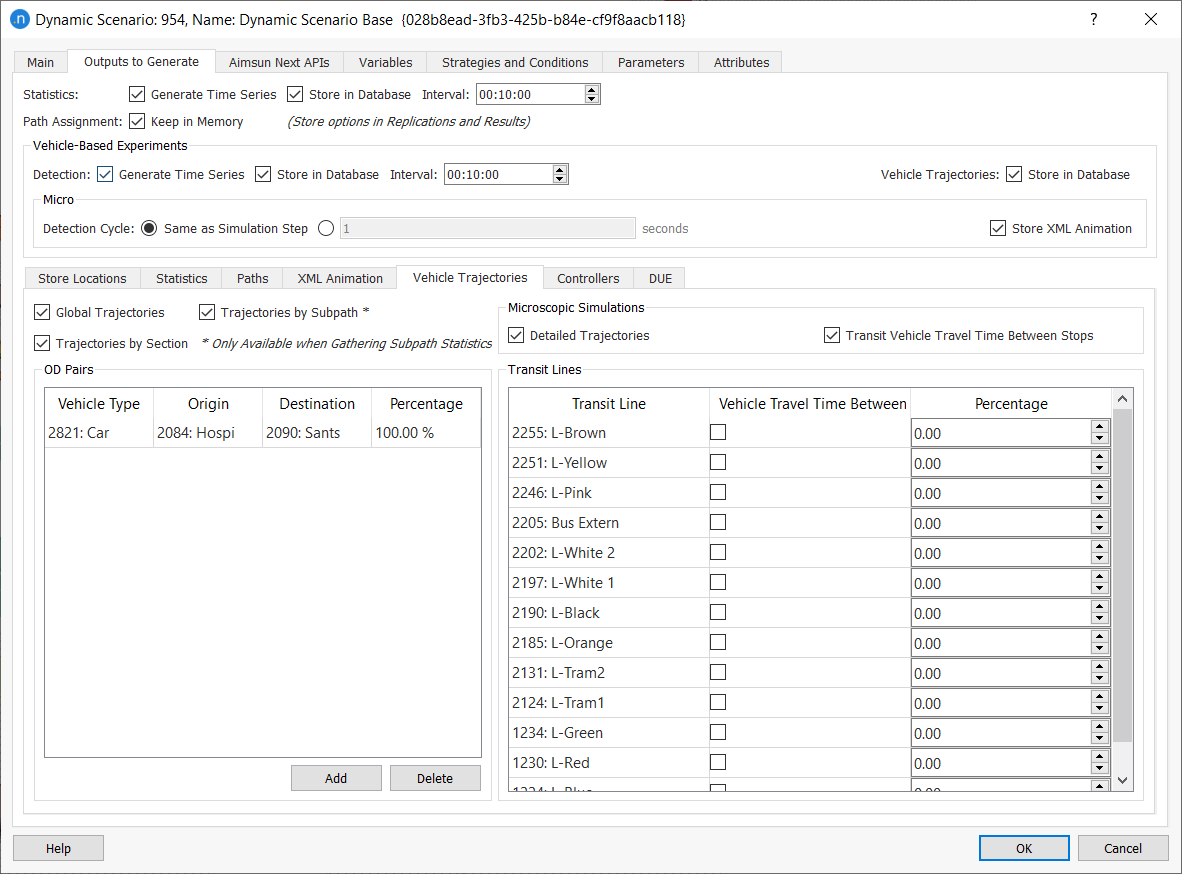
Specify the OD Pairs and the percentage to get statistics for private vehicles. The percentage determines the proportion of vehicles that will be tracked. It is strongly recommended that the number of vehicles to track is limited as much as possible as this option can generate huge database files.
The Transit Lines table also gives the option to track a subset of vehicles for each line to help manage database size.
Vehicles in Subpath is available in Microscopic and Mesoscopic simulations.
Global and Section Trajectories are available in Microscopic and Mesoscopic simulations. Detailed (simulation step) and Vehicle Arrival/Departure Time at Stop are only available in Microscopic Simulations.
Global Trajectories
These statistics provide general information about the vehicles that have exited the network. The database table is MIVEHTRAJECTORY for microscopic simulations and MEVEHTRAJECTORY for mesoscopic simulations.
- Generation Time: time when vehicle is generated.
- Entrance Time: time when the vehicle enters the network.
- Exit Time: time when the vehicle leaves the network.
- Travel Time can be calculated using the exit time minus the entrance time.
- Delay Time: delay time in seconds.
- Distance Traveled: total vehicle's distance traveled in meters.
- Expected Travel Time: travel time expected from a previous run, in seconds. This expected travel time is coming from the input APA file, zero in case of no input APA file.
- Path type: vehicle's path type:
- 0: Route Choice
- 1: Path from APA
- 2: OD route
- 3: Transit line
- 4: Lost vehicle with random path
- Speed: speed in m/s. Only in meso.
Section Trajectories
These statistics provide information of vehicles at each section in its path. The tables are MIVEHSECTTRAJECTORY (microscopic simulation) and MEVEHSECTTRAJECTORY (mesoscopic simulation).
- Exit Time: time when the vehicle exits the section.
- Travel Time: time that the vehicle takes to go through the section.
- Delay Time: delay time in the section.
Detailed Trajectories
These statistics provide information of vehicle each simulation step. It is only available in microscopic simulations. The table is MIVEHDETAILEDTRAJECTORY.
- Lane: section lane index where the vehicle is located.
- xCoord: global x coordinate.
- yCoord: global y coordinate.
- Stationary Time: simulation stationary time.
- Speed: speed in km/h or mph depending on network units.
- Distance Traveled: distance traveled by the vehicle in meters.
- Acceleration: vehicle acceleration in m/s2.
Vehicle Arrival/Departure
These statistics provide information between two consecutive Transit line stops that belong to the same line. The table name is PTBETWEENSTOPS and contains the following data:
- ptline: transit line identifier
- from stop: origin transit stop identifier
- to stop: destination transit stop identifier
- count: number of vehicles that have traveled between both stops
- travel time: the travel time in seconds between the stops including the dwell time of to stop.
Note: The statistics for the beginning of the line to the first stop are indicated by a 0 in from stop. The statistics from the last stop to the end of the line are indicated by a 0 in to stop.
Vehicles in Subpath
These statistics provide the information for all vehicles that have completed any subpath. The table name is SUBPATH_VEHICLES.
- Delay Time: vehicle delay time in the Subpath. This is the difference between the expected travel time (time it would take to traverse the Subpath under ideal conditions) and the experienced travel time.
- Dwell Time: time at stops.
- Number of Stops: number of stops while traveling along the Subpath.
- Speed: speed measured while traveling along the Subpath.
- Stop Time: time spent at a stop while traveling along the Subpath.
- Travel: number of meters traveled by the vehicle in the Subpath.
- Travel Time: time that takes to traverse the Subpath.
- Waiting Time in Virtual Queue: waiting time in virtual queue. The vehicles taken in account in computing this statistic are those which have completed their trips on this subpath.