Storing Run Outputs
A flexible mechanism for storing outputs is available. The outputs (statistics and detection) can be stored in either an Automatic or a Custom database. In the Custom case, the location of the data is configurable.
The database can be defined in the Project Properties or can be defined separately for each scenario in the Scenario Editor. Its format is described in detail in the Output Database Definition section.
The databases supported by Aimsun Next are SQLite and PostgreSQL.
Automatic Database
Automatic Databases: Aimsun Next can create automatic databases for both SQLite and PostgreSQL. When selecting the Automatic Using SQLite or the Automatic using PostgreSQL option, Aimsun Next will create a new database, if one doesn’t already exist, using the network name and stored in the corresponding network folder Model\Resources\Outputs.
Note that PostgreSQL is the recommended option for large scale projects, but it requires to have PostgreSQL installed first and to connect to the PostgreSQL server.
Custom Database
When selecting the Custom option, a list of all the available database drivers will appear. These can be:
-
SQLite: For this kind of database; select the QSQLite driver and a file with the extension *.sqlite or *.db. If the file selected does not exist it will be automatically created when storing the output data.
-
PostgreSQL: For this kind of database; select the PostgreSQL driver, specify the database name and the database parameters: username, password, host, and port.
PostgreSQL Configuration
To manage PostgreSQL databases, we recommend pgAdmin is installed for the operating system in use.
Creating a Data Source
In order to store the outputs as a database with a PostgreSQL database, first create a Data Base. Databases in pgAdmin are visible from the main menu.
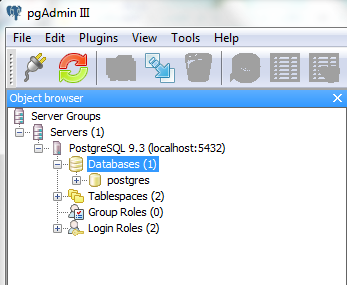
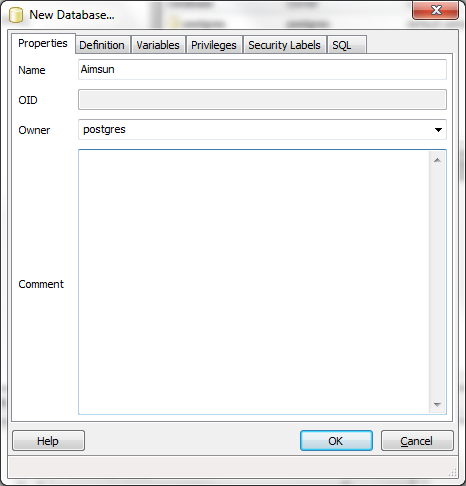
To create a new database, right click on Databases folder and select 'New Database...' option. On the 'New Database...' dialog, set the name and the owner of the database. It is essential that the owner has enough privileges to write into the database.
Once the database is already created, define the parameters as follows:
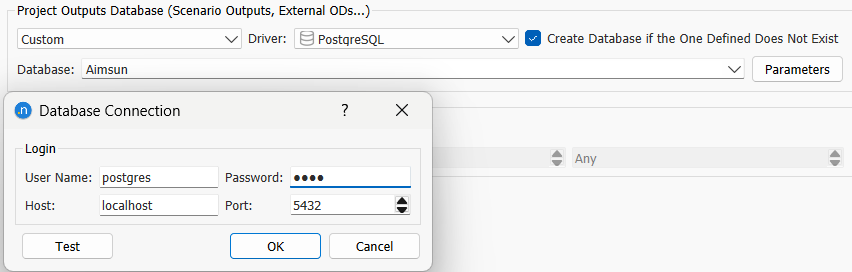
When Host is defined as localhost, it means it will look for the local computer; it is possible to set any IP address where there is a PostgreSQL server running on it.