Project Editor
The project properties can be edited by accessing the Project menu, Properties option.
Main
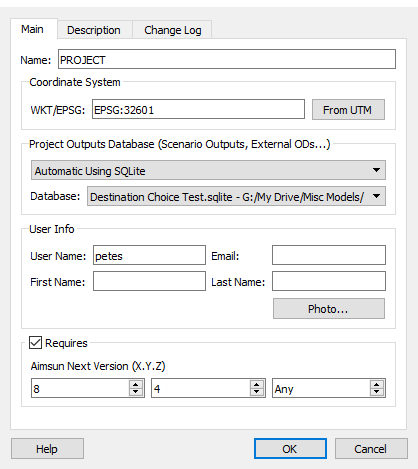
The properties to define are:
- Project Name: name of the project.
- myAimsun project: project in the myaimsun to link this ang to in order to share the comments among different users.
- Projection
- Location: path to the ang file this project is being loaded from.
- Project Outputs Database
- User Info
- The required Aimsun Next Version.
myAimsun project
In the Project Editor you can now see the current myAimsun project this document file is related to. To change it, select any of the projects available in the myAimsun project's list. Only projects where the current user has an Administrator role will be available.
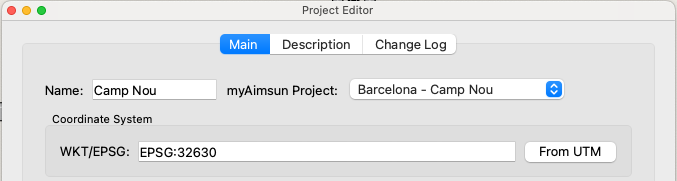
To log in or see the current logged user go to Help -> Account...
To see your role and the myAimsun projects you are part of, go to https://my.aimsun.com/projects/my-projects.
Projection
The projection system can be set from the time zone, or explicitly in the properties dialog. Information on projections and coordinate systems can be found at the Spatial Reference web site (http://spatialreference.org/ and the Aimsun Coordinate Systems section of this manual.
If the zone or the projection is not properly specified, Aimsun Next will not be able to translate the coordinates from meters (its internal units) to latitude and longitude.
Project Outputs database
Results from an Aimsun model run are stored in an external database. The type and the configuration of the database can be specified for each project. The available options are described in the section on Storing Outputs.
Aimsun Next version required by the project
Once a project is finished, the Aimsun Next version used to calibrate the project can be specified in the Requires field. If afterwards, the project is open using a different version of Aimsun Next, a warning message will be issued.
Description
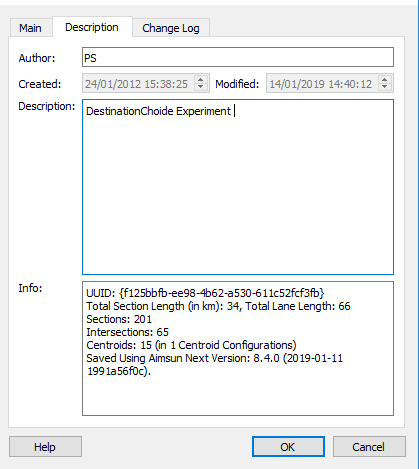
The description tab holds a user edited text description of the project and also some statistics about project size and Aimsun Next version.
Change Log
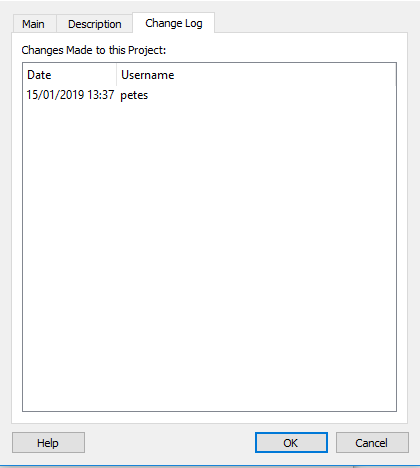
The Change Log records the date, time, and username for changes made to the project file.