Pedestrian Crossings
With Aimsun Next you can model pedestrian crossings, of an arbitrary length, at either the start or the end of a road section. Pedestrian crossings are, in a microsimulation, an extension of a node. Turns are placed on top of them to provide for the movement of pedestrians crossing the road. These pedestrian movements, like any other movement in a node, can be controlled by traffic lights as part of a signal group.
When simulating a non-signalized pedestrian crossing, the Aimsun Next microscopic simulator will give priority to pedestrians over vehicles: a yield restriction or stop line in the section is not required. If a yield restriction or stop line is placed at the end of the section, it will be used in the node to control any conflict movements, as usual.
Create a Pedestrian Crossing
To add a pedestrian crossing, select the tool  on the tool bar and then click on the start or the end of the section where you want to place the crossing. Pedestrian crossings can only be located at the start or the end of a section (or both) and nowhere else.
Editing a Pedestrian Crossing
If you want to change its length, click to select the crossing and drag its internal vertex to adjust the length.
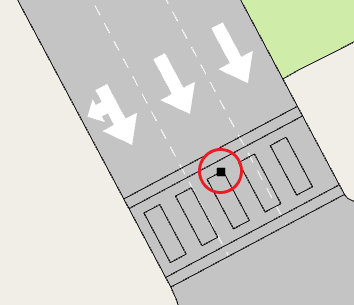
If you want to move the pedestrian crossing to a different section entirely, then hold down Ctrl, select the crossing, and drag it to the destination section.
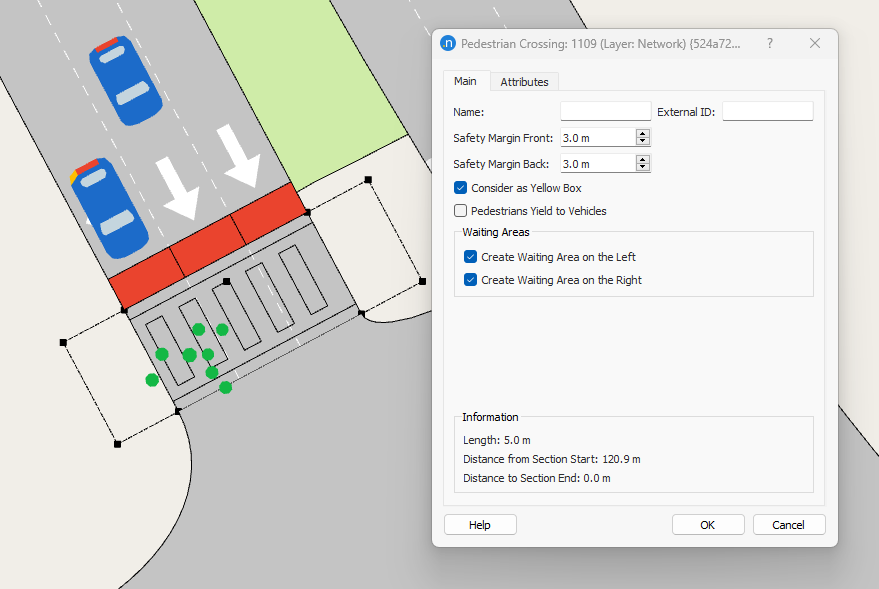
Like most Aimsun Next objects, you can edit a pedestrian crossing to fine-tune its parameters. Double-click the pedestrian crossing to open its dialog.
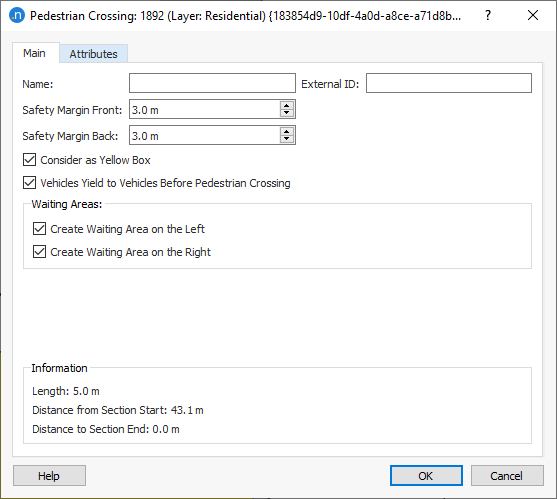
The following parameters are available:
-
Name and External ID.
-
Safety Margin Front and Safety Margin Back: Inside a pedestrian crossing, pedestrians have priority over vehicles. Safety Margin Front and Safety Margin Back define the safety distance inside the pedestrian crossing that vehicles need to assure to pedestrians when passing in front or behind the pedestrian respectively.
-
Consider as Yellow Box: Check this option if you want to model the crossing as a yellow-box area where no vehicles can stop inside blocking the pedestrian crossing. This is independent of whether the node is a yellow box.
-
Pedestrians Yield to Vehicles: When not checked (default), inside a pedestrian crossing, pedestrians have priority over vehicles. If checked, then vehicles have priority over pedestrians.
-
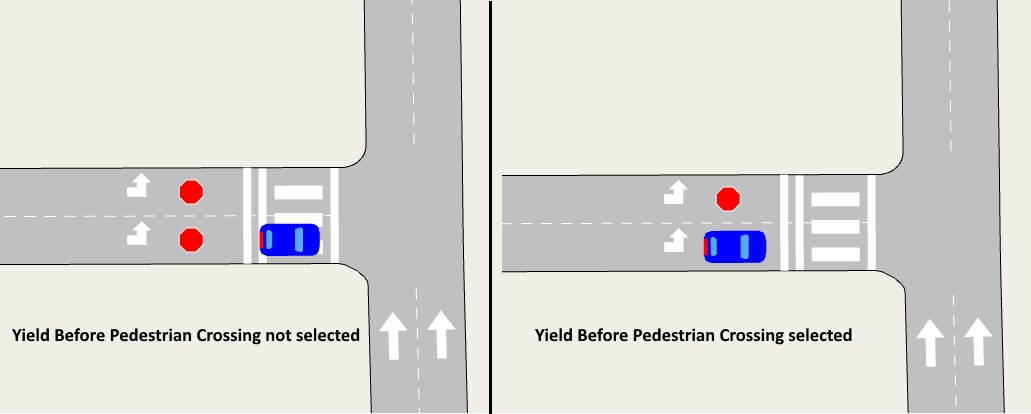
Vehicles Yield to Vehicles Before Pedestrian Crossing: For turns regulated by Yield, Stop, or RTOR rules, the option for vehicles to Yield to Vehicles Before Pedestrian Crossing is available in the dialog. In such cases, the stop line is always placed before the pedestrian crossing and this option controls where vehicles halt, according to different driving practices in some countries. Tick Vehicles Yield to Vehicles Before Pedestrian Crossing if you want vehicles to halt at the stop line. Untick this option if you want vehicles to halt at the end of the section, meaning they enter and wait on the crossing (see the two screenshots below).
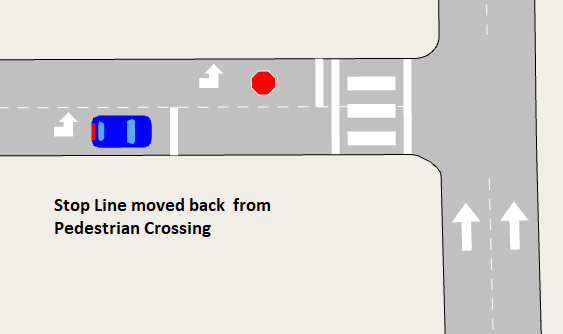
Note: If the stop line is set some distance away from the crossing and Vehicles Yield to Vehicles Before Pedestrian Crossing is ticked, vehicles will stop at the stop line and not at the crossing.
- Waiting areas are (optional) spaces next to a pedestrian crossing where pedestrians will gather and wait. They are automatically created when you add a new crossing but if you want to discard them, untick one or both of the options:
- Create Waiting Area on the Left
- Create Waiting Area on the Right
To move or resize a waiting area, click on the pedestrian crossing and drag the waiting areas vertices (highlighted below).
<br/>
Click OK to close the dialog and save your changes.
Pedestrian crossings are considered as conflicts in the yield model, therefore vehicles decelerate when entering the section before the crossing in case they need to stop for a pedestrian. However, when they are near enough, they assess whether the crossing has a pedestrian or not and continue at their desired speed. This proximity is controlled by the visibility to yield parameter in the preceding turns to a crossing.
Time Series Tab
After completion of a simulation with pedestrians, you can view the corresponding time series on this tab.
Attributes Tab
Any additional attributes of the pedestrian crossing are displayed on this tab.