Extensible Metadata model
The meta data model provides facilities not normally available in languages such as C++. In C++, once a class has been defined, it is not possible to add attributes; attributes must be known at compile time and it is not possible to discover attributes at run time. Some languages do provide such functionality, and much more, for example Java through its Reflection interface.
Within Aimsun Next, scripting; the extensible meta model does allow attributes to be added to an object and for them to be discovered dynamically as scripts are run. The data model provides:
- Extensibility: adding new attributes to any class, to allow the addition of new info to any object instance.
- Discovery: detecting the existence of new attributes at runtime.
Types and Columns
The Meta Data model is based on Types and Columns. Type is synonymous with class, while Column is synonymous with attribute.
Creating a Type could be thought of as defining a table, whose columns represent Type Columns and whose rows represent Type instances (objects).
TypeA:
ID  Column1 Column2 Column3 Column4
1465    ####    ####    ####    ####
3566    ####    ####    ####    ####
Accessing an object’s Type informs whether the object is a section, a centroid, a vehicle, etc.
Code Example
To get the type of an object, call the method getType()
t = myObject.getType()
print t.getName()
Where t is an instance of the class GKType. If myObject is a road section, calling getName() on t will return the string "GKSection".
To get the list of columns in a type:
cols = t.getColumns( GKType.eSearchOnlyThisType )
and to get all attribute names and values for the object:
for col in cols:
    if col.getColumnType() != GKColumn._GKTimeSerie and myObject.getDataValue(col)[0] != None:
        print col.getName()+": "+myObject.getDataValue(col)[0].toString()
If a specific get method is available to access an object’s attribute, it is more convenient to call it
speed = section.getSpeed()
rather than use the meta data model:
attr = section.getType().getColumn( "GKSection::speedAtt", GKType.eSearchThisAndParentTypes )
speed = section.getDataValueDouble( attr )
To summarize, the meta model should be accessed when:
- a specific method to retrieve the data doesn’t exist, or
- the data has been added at runtime, therefore no get method exists.
It should be noted that not all attributes of an object are accessible through the meta data.
Meta Editing by Script
To see which columns are available in a Type, one method would be to use a script as follows:
sectionType = model.getType( "GKSection" )
attributes = sectionType.getColumns( GKType.eSearchOnlyThisType )
for x in attributes:
    print "Name :" + str(x.getName())
    print "External Name: " + str(x.getExternalName())
    print "Column Type: " + str(x.getColumnType())
    print "Description: " +str(x.getDescription())
To add a column:
sectionType.addExternalColumn( "GKSection::roadNoiseFactor", "Road Noise Factor", GKColumn.Double )
Meta Editing in the Aimsun Next
An alternative method is to use the Aimsun Next Types window and Type Editor. Select the menu option Window/Windows/Types. The Types window will then shown all types in the system.
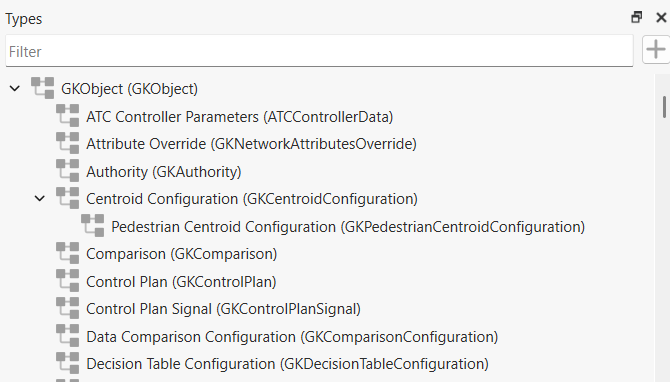
Adding a new Attribute
Double click on a type to access its editor.
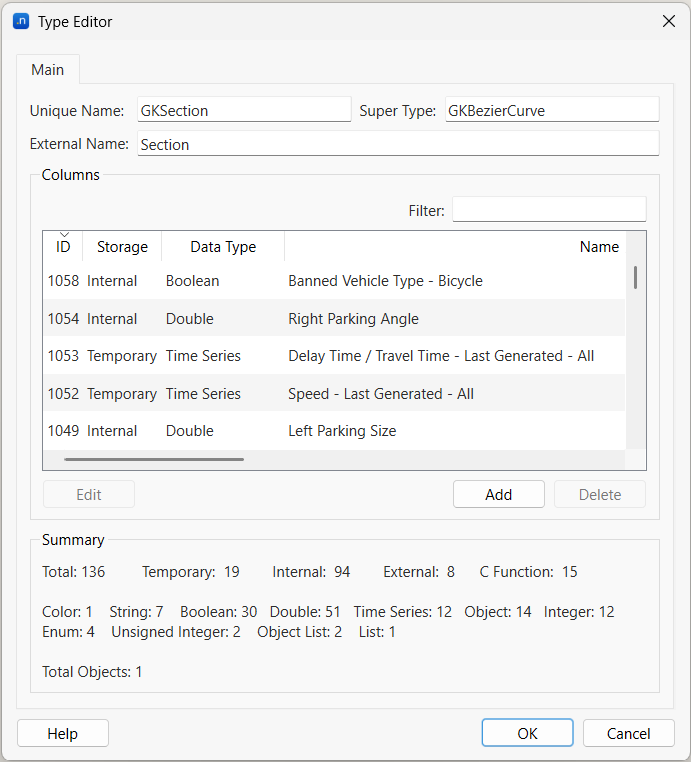
To add a new attribute to the type, select the Add button in the editor.
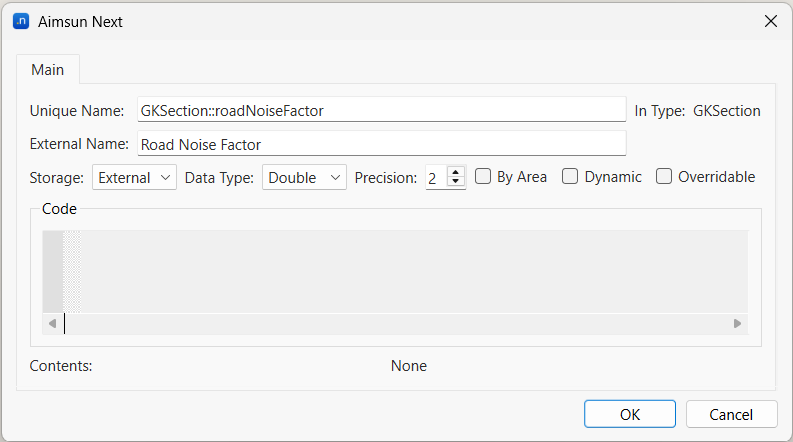
When defining a new unique name, use the convention TypeName::Attribute. This will ensure that it is unique throughout the model and cannot be inadvertently duplicated in different types.
Storage for attributes can be defined by the user as:
- External: Aimsun Next will provide storage in memory and in the ANG file.
- Temporal: Aimsun Next will provide storage in memory.
- Python Function: a function written in Python.
The data type can be:
- Integer
- Unsigned Integer
- Boolean
- Double
- String
- CString
- String List
- Object
- Time Series
- Time
- Date
- Date Time
- Color
- Time Duration
Note however, that the values of the Time Series type will not be saved in the ANG file, even if the storage is set to external, so when the ANG file is closed and re-opened, the attribute will still be present, but it will be empty. If the values have been saved into the database, they can then be retrieved anytime. If the column is external, it needs to be retrieved or calculated again.
To access the data value above, the code would be as follows:
attr = model.getColumn( "GKSection::roadNoiseFactor" )
roadNoiseFactor = section.getDataValue( attr )
All the attributes natively defined within the Aimsun Next classes have a storage type Internal and as such are not editable. Note also External attributes cannot be deleted or edited, so when such an attribute is created, it is not possible to make any changes using the Type Editor window, however it can be edited using scripting.
If the selected data type is Object, a new drop down menu will appear in order to choose the object type, and the setting Allow 'None' indicates whether the value can be empty or not.

The storage type Function allows defining an attribute whose content is dynamically calculated each time it is accessed (read via GUI or Python script). The calculation is defined by the Python function provided in the dialog code text box.
The function should be defined as:
def eval_attr( object ):
    # compute the value
    return res
Where object is a reference to the object for which the attribute is evaluated; res is the value returned by the function, that will be the value of the attribute for the object. The type must be coherent with that selected as Data Type.
For example, to compare the flows of two microsimulation scenarios, whose averages IDs are 2880 and 2890, define a new attribute as shown below.
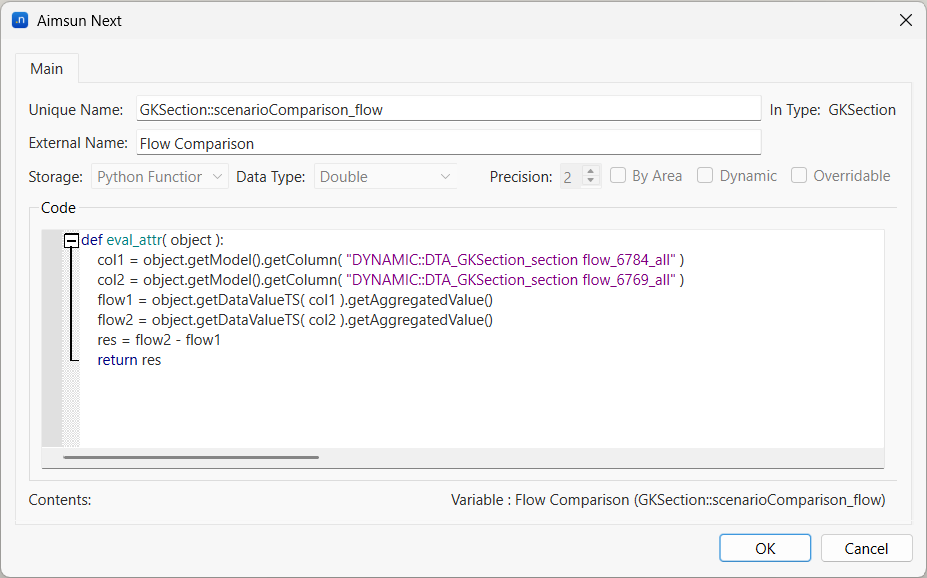
Note that time series cannot be stored into an attribute defined as function, the aggregated value of the flow time series of the averages must be calculated.
The By Area option is currently not used. The Dynamic option is used to specify that the value of the attribute can change even if not manually modified by the user; only dynamic attributes can be used to define a trigger.
Deleting Columns
There is a tool to delete any undesired external columns. It is highly recommended to delete columns that are no longer in use, as these columns will be otherwise consuming unnecessarily memory, space and loading time resources. This feature is available at menu Data Analysis > Delete Columns.
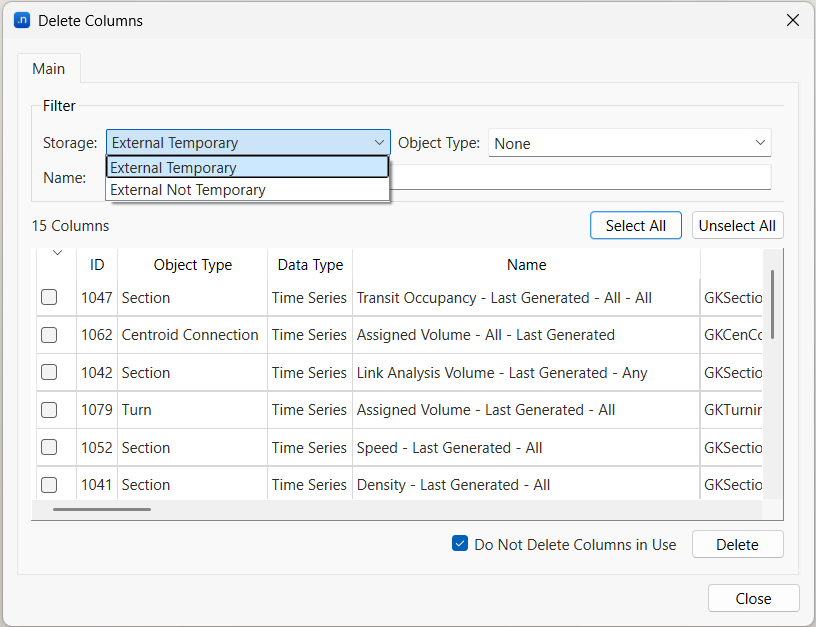
To make easier to find a specific group of columns in the list, a filter is available. The user can filter results by type of object, name of the column, and type of storage (whether it is a temporary column or not). The Select All button selects all the columns in the current list and the Delete button removes all the selected columns. The Do Not Delete Columns in Use option prevents the deletion of columns that are currently used, even if they are checked to be deleted.